Technical And On-Page SEO, Diagnosed First
Two layers, two different failures, and a test that tells you which one you have
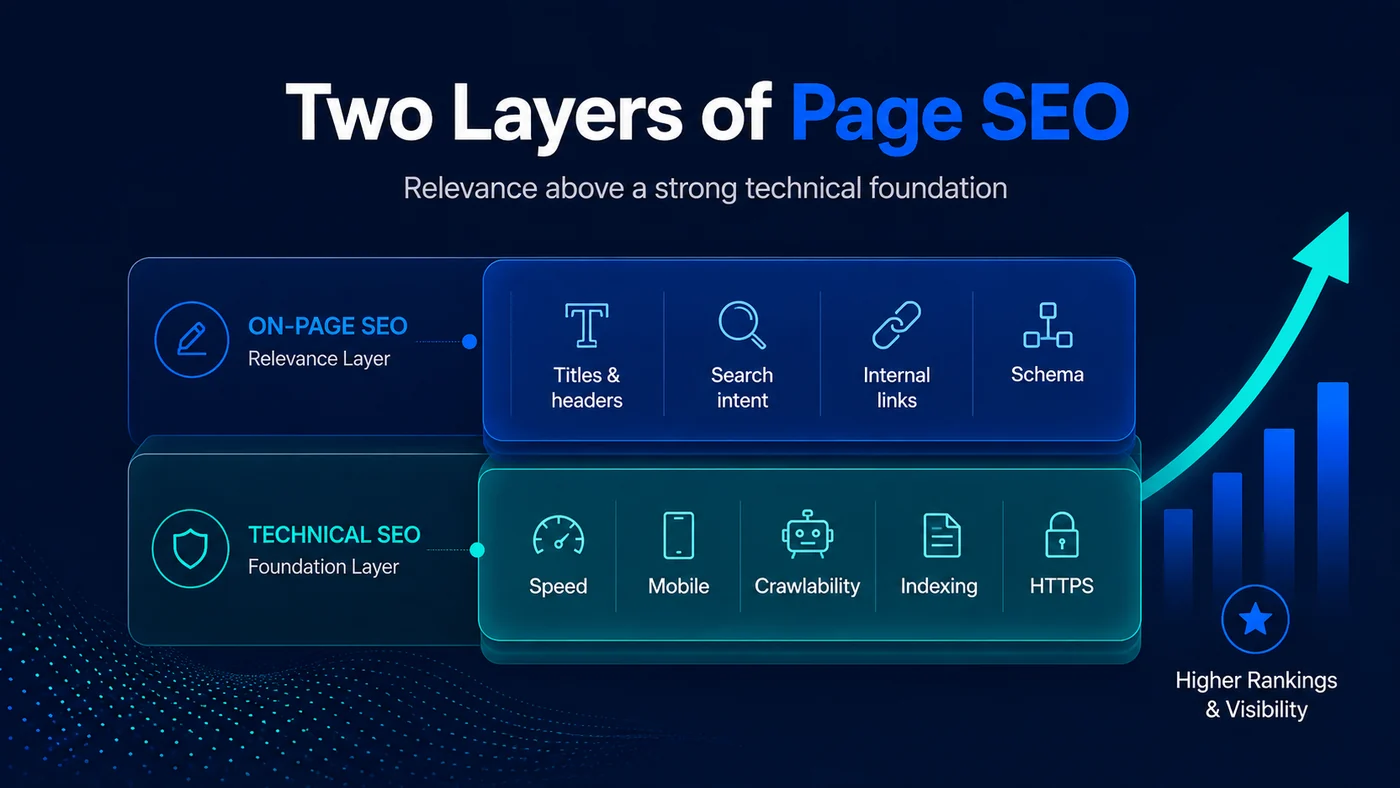
Technical SEO decides whether a search engine can reach, render and index your page. On-page SEO decides what that page means once it is indexed. One controls access, the other controls interpretation. Most sites are sold work on the wrong one, because nobody ran the test that separates them.
- Findings ranked by the traffic they hold back, not by a severity colour a tool assigned them
- A specification your developer can act on without interpreting it, not a 200-row crawl export
- We tell you when it is not technical. Three of the four ranking failures are not, and we say so
- Crawl and index
- Rendering
- Site structure
- On-page and entities
- Migrations
Which layer is your problem?
- Not in the index? Technical. The page cannot be reached, rendered or indexed.
- Indexed but no impressions? On-page. It is understood as an answer to nothing.
- Impressions but the wrong page ranks? Cannibalisation, not a fault.
- Everything fine and still behind? Coverage. You are being out-answered.
Free, 30 minutes, and you keep the findings either way.
Technical and on-page SEO in five points
Technical SEO governs whether a search engine can reach, render and index a page. On-page SEO governs what that page means once it is indexed. One controls access, the other controls interpretation.
- They fail differently and they look identical on a graph. A flat line can mean the page is not indexed, or indexed and misunderstood, or beaten on coverage. Three different fixes.
- Access comes first, always. Publishing into a site that cannot be crawled properly is the most expensive mistake in search, because none of it can even be measured.
- A crawl export is not an audit. An audit is a prioritised list of what is holding traffic back, with the evidence attached and the fix specified.
- The commonest real fault is not exotic. It is duplicate intent, thin templates and internal links pointing at redirects, on sites whose owners were sold Core Web Vitals work instead.
- Migrations are the one event that undoes years of work overnight. Tell us before the launch date is set, not after it has slipped.
Not sure which layer is costing you?
The free thirty-minute review runs the diagnostic below on one page you care about, live, with your Search Console open. You will leave knowing whether you have a technical problem, an on-page problem, a cannibalisation problem or a content problem, and we will tell you plainly when the answer is the last one.
What is the difference between technical SEO and on-page SEO?
Technical SEO governs whether a search engine can reach, render and index a page. On-page SEO governs what that page means once it is indexed. If the page is not indexed it is technical. If it is indexed and not ranking it is on-page.
The two get sold together and bought together, which is why so many businesses cannot tell which one they are paying for. They are not the same discipline, they usually fail for different reasons, and the order you fix them in decides whether the money does anything.
| Technical SEO | On-page SEO | |
|---|---|---|
| What it controls | Whether the page can be reached, rendered and indexed | What the page is understood to mean once it is |
| Typical symptom | The page is missing from the index, or indexed in the wrong form | The page is indexed, gets impressions for nothing, or ranks for the wrong query |
| Where you check | Search Console URL inspection and the pages report | Search Console performance, filtered to that page |
| Usual causes | robots.txt, noindex, canonicals, redirect chains, render blocking, orphan pages, faceted URLs | Intent mismatch, missing entities, heading structure, thin coverage, two pages competing |
| Who fixes it | Usually a developer, working to a specification | Usually a writer or an SEO, working to a topical map |
| How fast it shows | Days to three weeks once recrawled | Three to eight weeks in impressions, longer in positions |
The boundary matters commercially as well as technically. Technical work is bounded: there is a finite list of things that can be broken, and when they are fixed they stay fixed. On-page work is not bounded, because there is always a more complete answer someone could publish. Anyone selling you an open-ended technical retainer has the economics of their own service the wrong way round.
Where the two meet is structure: internal links, URL patterns and how pages relate to one another. That sits in both layers, and it is where our semantic SEO and topical authority work overlaps this page.
How do you know which of the two is actually your problem?
Take one page that should rank and does not, then ask three questions in order: is it indexed, does it get impressions, and is one of your own pages ranking instead. The first no you hit names the layer.
The three questions, and what each answer means
Swipe the chart sideways to read all of it.
Run it yourself before you speak to anyone. Open Search Console, inspect the URL, and read what it tells you. A page that returns “URL is not on Google” has a technical problem and no amount of rewriting will help it. A page that is indexed, gets a thousand impressions and sits at position 40 does not have a technical problem, whatever a crawler’s severity score says.
The reason this matters is commercial. Crawl tools generate findings on every site ever built, because there is always a missing alt attribute or a redirect that could be shortened. A findings list is not a diagnosis. The diagnosis is the sentence that says which of those findings is costing you traffic today, and a tool cannot write it.
How does True SEO run a technical and on-page audit?
In four layers, in order: access, structure, coverage, conversion. Nothing on a layer gets worked on while the layer beneath it is still failing, because the result would not be measurable.
The four layers and the rule that stops work being wasted
Swipe the chart sideways to read all of it.
What you receive is a specification, not an export. Every finding carries the URL pattern it affects, the number of pages involved, the evidence that it is costing something, the fix in language a developer can implement, and a position in the queue. Findings that cost nothing are listed and marked as such rather than padded into the total.
The same four layers drive our SEO audit service, which is the standalone version of this work when you want the diagnosis without the implementation.
What does the technical layer actually cover?
Everything that decides whether a page can be found, fetched, rendered and stored: crawl paths, indexation rules, server responses, rendering, speed, and the URL architecture underneath all of it.
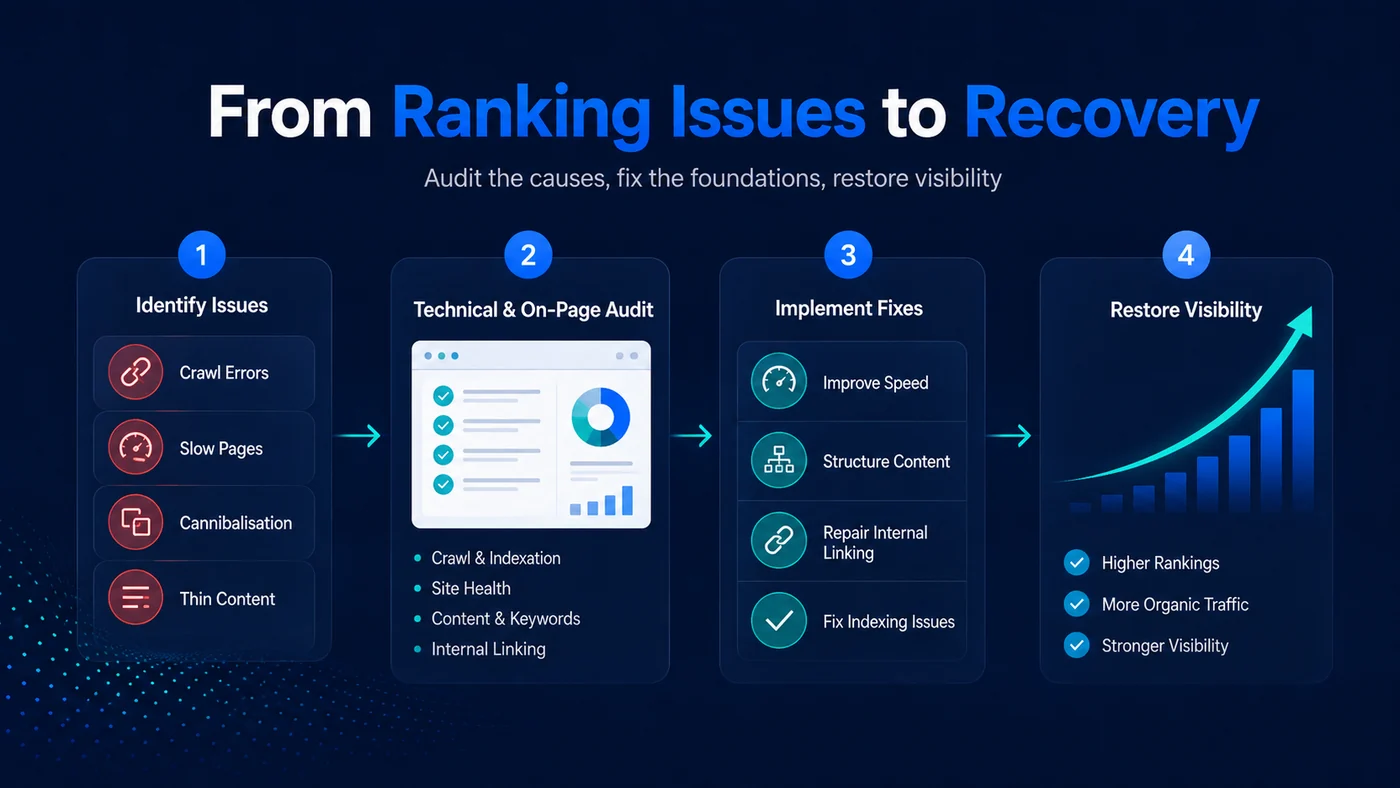
From ranking issues to recovery, in four stages
Swipe the diagram sideways to see all of it.
| Area | What goes wrong in practice | How you would know |
|---|---|---|
| Crawl access | robots.txt blocks a directory nobody remembers adding; parameters generate millions of URLs | Crawl stats fall or spike without a content change |
| Indexation | noindex left on after a launch; canonicals pointing at the wrong version; pagination self-canonicalising | The pages report shows “excluded by noindex” or “alternate page with canonical” |
| Rendering | Content that only exists after JavaScript runs, and the crawler never sees it | URL inspection’s rendered HTML is missing your main copy |
| Redirects | Chains three deep, loops, and internal links still pointing at the first hop | Crawl shows internal links resolving through 301s rather than to 200s |
| Speed and stability | Uncompressed hero images, render-blocking scripts, layout that jumps on load | Core Web Vitals fails on mobile while passing on desktop |
| Structure | Orphan pages with no internal link; templates that give every page the same links | Important pages have fewer unique inlinks than your privacy policy |
Two of these are worth more attention than they usually get. Rendering, because a site built as a single-page application can be beautiful, fast and completely invisible. And structure, because a template that links every page to every other page is the same as linking to none of them, which is the flat-site problem behind most sites that plateau after a year. Our optimised web design service exists so those decisions are made before a build rather than repaired after one.
What does the on-page layer cover?
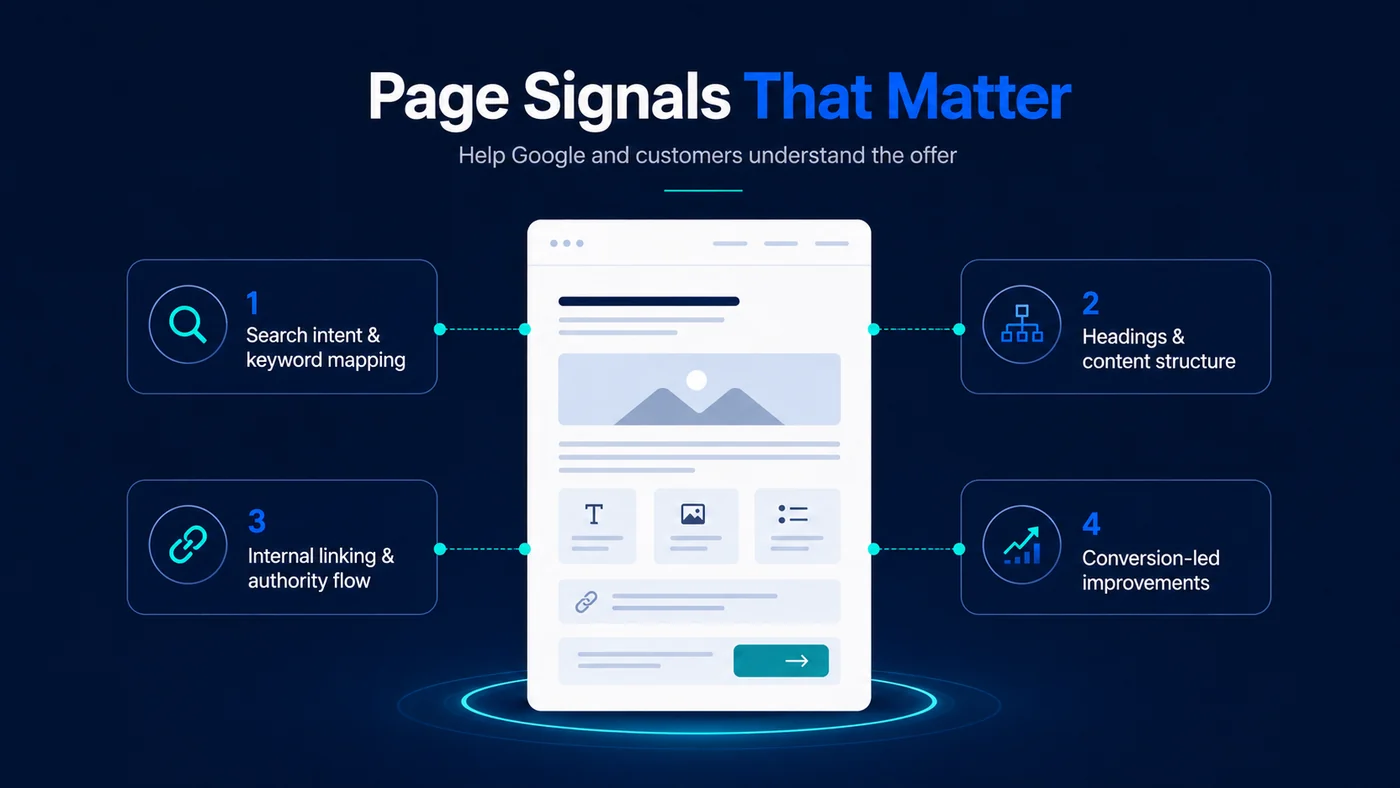
Everything that decides what an indexed page is understood to be about: the intent it targets, the entities it names, the headings that carry them, the internal links pointing in, and whether the page finishes the job it started.
The four on-page signals worth working on
Swipe the diagram sideways to see all of it.
On-page work has changed more than technical work has. It used to mean placing a phrase in a title, a heading and the first sentence. It now means making a page legible as a complete answer to one question, using the vocabulary the subject actually uses, so that a search engine and a language model can both extract a passage from it and be right.
That is why we lead on entities rather than keywords. A page about “technical SEO” that never names crawling, indexation, rendering, canonicalisation or Core Web Vitals is a page about the phrase, not the subject, and it will lose to one that covers the subject even if it repeats the phrase less often.
Two pages competing for the same query
This is the most common on-page fault we find, and it is almost never diagnosed by the site owner, because both pages look fine on their own. The symptom is a query where your position oscillates, or where the page Google chose is not the page you would have chosen.
The fix is a decision, not an edit. Either the two pages answer genuinely different questions, in which case make that obvious in the H1, the opening sentence and the internal links pointing at each. Or they do not, in which case merge them, redirect the weaker one and keep the surviving page’s URL. Doing neither, and rewriting both, is how sites end up with four pages competing instead of two.
How do you stop filters, pagination and faceted navigation eating the crawl budget?
Decide which filter combinations are worth indexing before you build them, then make everything else uncrawlable rather than merely non-indexable. A noindex tag still costs a crawl; a link that does not exist does not.
This is the defining technical problem of any site with an inventory: a property portal, an ecommerce catalogue, a dealership, a directory. Price, location, size and sort parameters combine into effectively unbounded URLs, and a crawler will happily spend your entire budget on them while your service pages go unvisited for weeks.
| URL type | Example | Treatment | Why |
|---|---|---|---|
| A filter with real demand | Category plus one high-demand attribute | Give it a static, linkable URL and its own copy | People search this combination, so it deserves a page |
| A filter with no demand | Three attributes combined, plus a sort order | Do not link it at all; render via POST or fragment | Nobody searches it, and every crawl of it is budget spent on nothing |
| Pagination | Page 2 onward of a listing | Keep it crawlable and self-canonical, link it in the markup | It is the only route to deep inventory; canonicalising it back to page one hides that inventory |
| Sort and view parameters | Order by price, grid or list view | Canonical to the unsorted URL | Same items, same intent, different order |
| Sold or expired items | A let property, a sold vehicle | Keep the URL live with a status change and links onward | A 404 throws away the links and the history the page earned |
The last row is the one that costs the most and is questioned the least. Deleting an expired listing looks like tidiness. What it actually does is delete an indexed, linked page and replace it with an error, at exactly the point when that page has finished accumulating whatever authority it was going to accumulate.
How do you audit a WooCommerce or Shopify site differently from a service site?
On a service site the risk is thin coverage across a handful of pages. On a store the risk is scale: templates repeat every fault thousands of times, and the architecture decides whether categories support each other or compete.
| Service site | WooCommerce or Shopify store | |
|---|---|---|
| First thing checked | Whether each page answers one intent completely | Whether the category architecture matches how people search |
| Biggest crawl risk | Orphan pages nobody links to | Faceted URLs, sort parameters and internal search results |
| Duplication source | Two service pages describing the same service | Variant URLs, and Shopify’s collection and product path duplication |
| Content problem | Not enough depth per page | Manufacturer descriptions repeated across every competitor |
| Where the money is | Six to twenty commercial pages | Category pages, not product pages, for almost every store |
| Schema focus | Service, FAQ, breadcrumbs, the people behind it | Product, availability, reviews, breadcrumbs |
Platform matters less than most people expect, and structure matters more. We cover the store-specific decisions in depth on our Shopify and ecommerce SEO page and in the WooCommerce SEO work, and the category-level thinking behind both comes from the same topical mapping used everywhere else.
What breaks when a site migrates without an SEO plan?
The redirects, the internal links, the indexation rules and the measurement, usually all four at once. A migration is the only routine event that can undo three years of search work in a single night.
Preventing that is a service in its own right. Our website migration SEO service, which protects rankings through a move covers the baseline, the address mapping and the weeks after launch.
The same migration, run two ways
Swipe the chart sideways to read all of it.
The commonest single failure is the staging noindex shipping to production. It is invisible in the browser, it does not break anything a stakeholder would notice, and it removes the entire site from search within days. The second commonest is redirecting everything to the homepage, which passes almost nothing and tells Google the old pages simply no longer exist.
The pre-flight itself is not expensive, and it is one of the few pieces of SEO work with a hard deadline attached. If you know a rebuild, a replatform or a domain change is coming, that is the moment to talk, not the week after it lands.
How long does a technical fix take to show in rankings?
Access fixes show in days to three weeks once the pages are recrawled. Structural and on-page work shows in impressions within three to eight weeks, and in positions across a quarter or more.
| Fix | Typical time to show | Where you see it first |
|---|---|---|
| Unblocking a page or removing noindex | Days to two weeks | Indexed page count in the pages report |
| Redirect and internal link repair | Two to four weeks | Crawl stats, then impressions on the repointed pages |
| Render fixes on a JavaScript site | Two to six weeks | Rendered HTML in URL inspection, then impressions |
| Speed and Core Web Vitals | Four weeks to a quarter | Field data in the Core Web Vitals report; ranking effect is small and real |
| Heading and entity rewrites | Three to eight weeks | Impressions on that page, before positions move |
| Merging two competing pages | Four to twelve weeks | One page taking the query cleanly instead of both oscillating |
Two honest caveats. Recrawl speed depends on how often Google already visits you, so a site it crawls daily sees technical fixes faster than one it visits monthly, and that is not something a fix can change on its own. And Core Web Vitals is a real ranking input with a small effect that is routinely oversold; it is worth doing, and it is almost never the reason a page sits at position 40.
What does technical and on-page SEO cost, and how is it scoped?
It is scoped from the diagnosis and quoted as a fixed piece of work, not billed by the hour, because the hours are not the thing you are buying and nobody can estimate them honestly before looking.
Four things move the number, and site size is only one of them. How many URL patterns exist, because a fault in a template is one fix and a fault across six templates is six. Whether the site renders server-side or in the browser, which changes what can be verified. Whether you want the specification or the implementation. And whether a migration is involved, which is a deadline rather than a task list.
The free thirty-minute review comes first, and it produces the scope. If the review finds the site is technically clean, we will say so and point you at whatever is actually costing you, which is frequently coverage rather than anything on this page. For market rates across the UK generally, our guide to what SEO costs in the UK states the bands without selling a tier, and our monthly SEO packages cover ongoing work rather than one-off repair.
Why True SEO
True SEO Consultants Ltd is a Cardiff-based SEO consultancy working with businesses across the UK and internationally. Technical work here is led by a named senior consultant, delivered as a specification your own developers can implement, and measured against the traffic it was supposed to release rather than against the number of findings closed.
Frequently asked questions about technical and on-page SEO
Do I need technical SEO if my site is new and was built recently?
Often yes, and for a different reason than an old site. New builds fail on rendering, on staging rules shipped to production, and on architecture decided by a designer rather than by search demand. A recent build is not evidence of a crawlable one; it is evidence that nobody has checked yet.
Is technical SEO a one-off project or an ongoing service?
Mostly a project, with a small ongoing watch. The list of things that can break is finite, and once they are fixed they stay fixed until someone changes the site. What is genuinely ongoing is monitoring: a developer ships something, a plugin updates, a platform changes a default. That is a monthly check, not a retainer’s worth of work, and we will say so.
Can you work with our in-house developers rather than making the changes yourselves?
Yes, and it is the arrangement we prefer where the capability exists. You get a written specification with the affected URL patterns, the change, the acceptance test and the priority. Your developers keep control of their own codebase, and we verify each item after release rather than assuming it shipped.
Does Core Web Vitals really affect rankings?
Yes, as a small input, and it is consistently oversold. It matters most where two pages are otherwise equal, and it matters enormously for conversion regardless of ranking. Treat a failing score as a real problem worth fixing and never as the explanation for a page sitting at position 40.
Our site is built in React. Is that a problem?
Only if the content is rendered exclusively in the browser. Server-side rendering or static generation solves it entirely. The test takes a minute: inspect the URL in Search Console and read the rendered HTML. If your main copy is missing from it, search engines are looking at an empty page, however good it looks to you.
What is the difference between an SEO audit and technical SEO?
The audit is the diagnosis; technical SEO is one of the things the diagnosis might prescribe. Our SEO audit service covers all four layers, and roughly half the time the largest finding is not technical at all.
Will you tell us if we do not need this?
Yes, and we do it often enough that it is worth stating. Three of the four outcomes in the diagnostic above are not technical work. If your site is indexed, fast and cleanly structured and you are simply being out-answered, the honest recommendation is content and internal structure, and we would rather say that on a free call than sell you an audit that confirms it.
How do you handle a site migration?
With a pre-flight before launch: a complete URL map, redirects tested on staging, internal links repointed at final destinations, sitemap and robots rewritten, and analytics re-verified. Then a post-launch watch for the first fortnight, because the problems that matter surface in the crawl data rather than in the browser.
Do you cover AI and LLM visibility as part of this?
The technical half is the same work: a page that cannot be indexed or snippeted cannot be retrieved by an AI system either. The differences sit in structure and extractability, which we cover on ranking inside AI and LLM results.
The next step
Find out which layer is costing you
Book a free thirty-minute review. We run the diagnostic on one page you care about, with your Search Console open, and you leave knowing whether the problem is access, meaning, cannibalisation or coverage. You keep the findings whether or not you buy anything.