A Google Business Profile for a chiropractor is the free listing that puts a clinic on Google Maps and in the map at the top of local searches. Google ranks those results mainly on relevance, distance and popularity. A clinic works on the first and last through its category, services, photos, posts and reviews, all worded inside the CAP rules.
Key points
- Google says local results depend mainly on relevance, distance and popularity, and that nobody can pay for a better local ranking.
- The primary category is the most specific category in Google’s list that names chiropractic. Extra categories belong only to separate services your own staff deliver.
- Services, the description and posts are marketing the clinic controls, so they follow the CAP accepted conditions list just as the website does.
- More reviews and positive ratings can help a clinic’s local ranking, according to Google. Incentives for reviews are banned under Google’s policy.
- One profile covers one staffed location. Chiropractors in public facing roles can have their own practitioner profiles under Google’s rules.
- Our audit of 50 UK clinic websites found 22 of 49 homepages do not describe the clinic as a local business in the behind the scenes details Google reads.
What decides where a chiropractor appears on Google Maps?
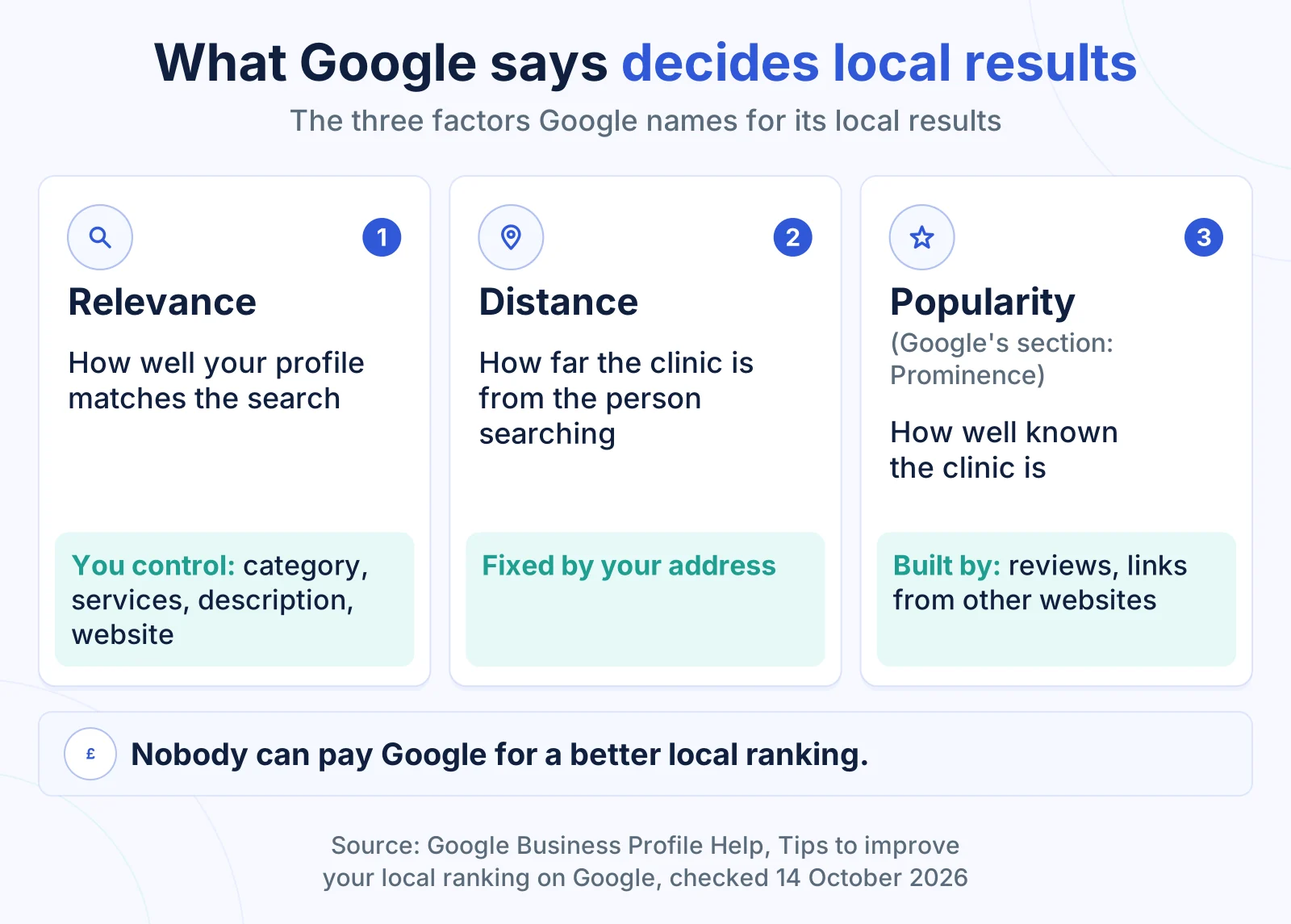
A chiropractor’s position on Google Maps is decided mainly by relevance, distance and popularity, the three factors Google Business Profile Help names for local results, so a clinic can improve two of them and cannot change the third.
Google defines each one on its help page “Tips to improve your local ranking on Google”:
- Relevance is “how well a Business Profile matches what someone is searching for”. The category, services, description and website build it.
- Distance is “how far each business is from the customer who’s searching”. It is fixed by where the clinic stands.
- Popularity is covered in the section Google heads Prominence: how well known a business is, based on info “like how many websites link to your business and how many reviews you have”.
Google adds that “businesses with complete and accurate info are more likely to show up in local search results”. It also says: “There’s no way to request or pay for a better local ranking on Google.” Decline any offer that claims otherwise.
For a clinic owner, the work splits cleanly. Relevance is mostly a one off set up with regular upkeep. Popularity rests partly on patient reviews and partly on other websites that link to the clinic, such as a professional association directory where the clinic is a member or a local paper that features it.
Which Google Business Profile category should a chiropractor choose?
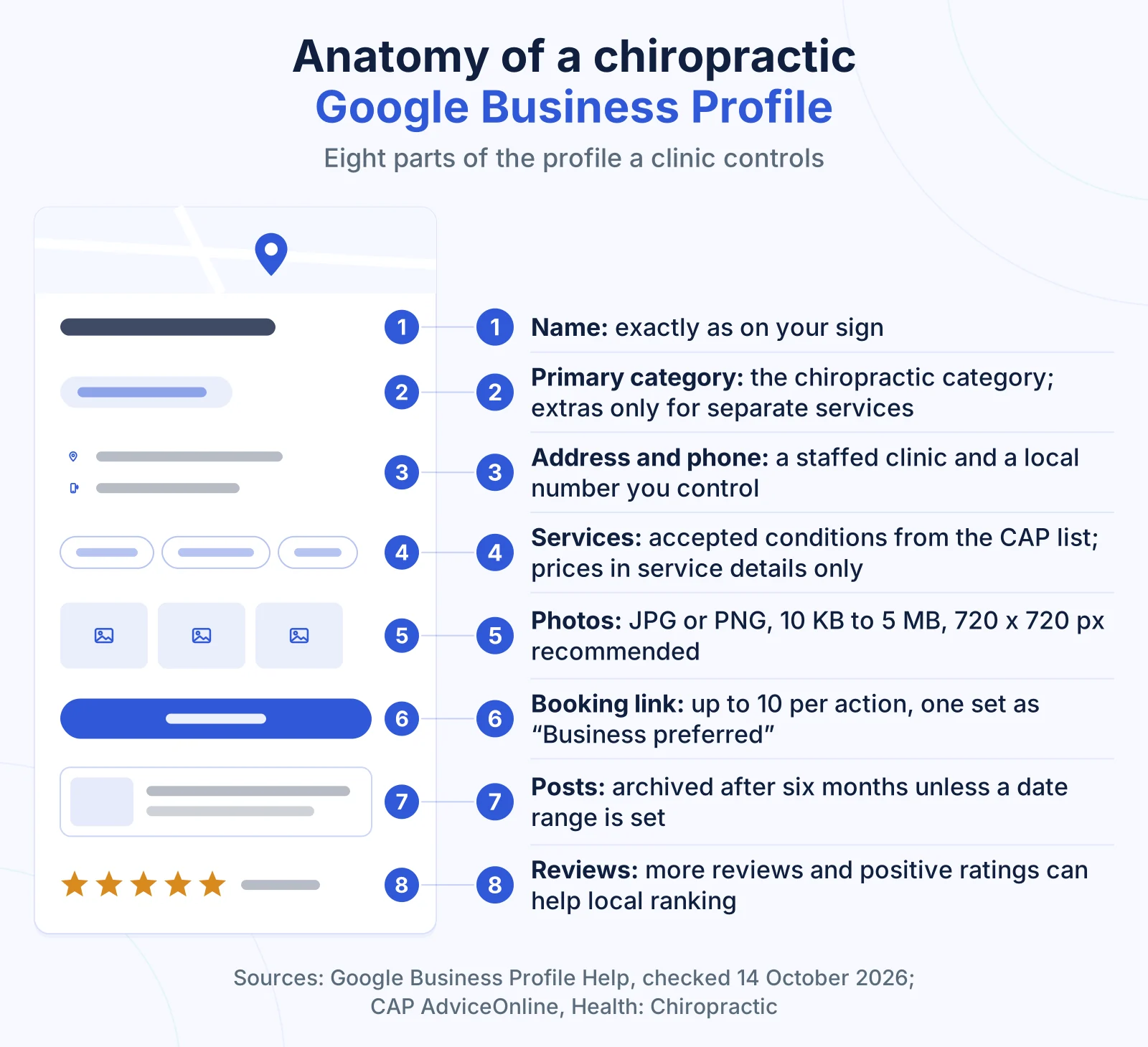
The best Google Business Profile category for a chiropractor is the most specific category in Google’s list that names chiropractic itself, set as the primary category, because Google asks for a primary category “that best describes your business”.
Google’s guidelines tell businesses to “use as few categories as possible” and to pick ones “as specific as possible, but representative of your main business”. Its own example is choosing “Nail salon” over “Salon”. The same logic puts a chiropractic category ahead of any broad health, medical or wellness category. Google also offers a test: choose categories that complete the statement “This business IS a”, not “this business HAS a”.
Additional categories are for “special departments or services”, in Google’s words. The category also affects what the profile can show, because Google says some profile features depend on the business category.
| Possible extra category | Add it when | Leave it off when |
|---|---|---|
| Physiotherapy | A physiotherapist on your team sees patients as a separate, bookable service | Chiropractors give exercise advice as part of their own appointments |
| Massage therapy | A massage therapist delivers massage as its own booked service | Soft tissue work happens inside a chiropractic appointment |
| A broad health or wellness category | Never as a second label for the same chiropractic work | Always, for a clinic whose core business is chiropractic |
| A category matching a symptom or a technique | Never: Google says “Do not use categories solely as keywords” | Always |
We recommend a single site clinic keeps to the primary category plus one or two extras at most, and each extra has to pass the “This business IS a” test on its own.
What should the clinic name, address and phone number show?
The clinic name, address and phone number on a chiropractic profile should match the sign above the door, a staffed address patients can visit and a local number the clinic controls, because Google’s guidelines for representing a business set a rule for each one.
Google says the name “should reflect your business’ real-world name” and that “including unnecessary information in your business name isn’t permitted”. A profile named “Smith Chiropractic Back Pain and Sciatica Clinic Leeds”, when the sign says “Smith Chiropractic”, breaks that rule. It also adds condition words to a field patients read as the clinic’s name.
| Set up | What Google’s guidelines say | The safe version |
|---|---|---|
| Town or conditions added to the name | Unnecessary information in the name is not permitted | The name exactly as on the sign and website |
| A rented mailing address with no clinic there | A virtual office address is not eligible for a profile | The address where chiropractors see patients |
| A desk or room in a shared workspace | Allowed only with clear signage, customer access in opening hours and staff | Your own sign, and your own staff there during stated hours |
| A second profile for the same clinic | “There should only be one profile per business” | One profile per location |
| A premium rate or call centre number | Premium numbers are not acceptable; a local number is preferred | A local number under the clinic’s direct control |
Google also bars “PO boxes or mailboxes located at remote locations”. The phone number “must be under the direct control of the business”, which rules out a number owned by a marketing agency.
How should services and the business description be written?
Services and the business description on a chiropractic profile should name conditions from the CAP accepted list and describe the clinic plainly, because the profile is marketing the clinic controls, and Google sets its own limits on both fields.
CAP AdviceOnline says the CAP Code has applied since 2011 to advertising “in other non-paid-for space online under their control”, which includes any third party website where the advertiser controls the content. In our reading, the services, description and posts a clinic writes on its own profile meet that test. This is not legal advice.
CAP AdviceOnline lists 19 conditions a chiropractor may claim to treat, each with its own limits: mechanical neck pain is on the list, for example, but neck pain after an injury such as whiplash is not. Our guide to what chiropractors can claim to treat sets out all 19 entries and how to reword a risky line.
Google’s limits sit on top of the CAP list:
| Profile field | Google’s rule | What it means for a clinic |
|---|---|---|
| Custom service name | Avoid “profanity, gibberish, personal information, prices or phone numbers”; breaking this means automatic rejection | Name services after accepted conditions, such as “Mechanical neck pain” |
| Service details | Descriptions and prices can be added | Put the first appointment fee here, not in the name |
| Business description | Give “useful information on services and products offered”; no links of any type; no focus on promotions, prices or sales | Say who the chiropractors are, what a first visit involves and which accepted conditions you see |
| Posts | Phone numbers in the text may get a post rejected | Use the call button instead, and check each post against the CAP list |
Google offers some predefined services for each business type and lets a clinic add custom ones. Check every predefined suggestion against the CAP list before you tick it, because the profile repeats whatever you accept.
Which photos and videos should a chiropractic clinic add?
Photos on a chiropractic profile should show a new patient the building, the entrance, reception, a treatment room and the chiropractors, because Google says an exterior photo “helps customers recognise your business when they visit”.
Google’s photo specifications are short and exact:
| Item | Google’s requirement |
|---|---|
| Format | JPG or PNG |
| File size | Between 10 KB and 5 MB |
| Recommended size | 720 px tall, 720 px wide |
| Minimum size | 250 px tall, 250 px wide |
| Quality | In focus and well lit, with no significant alterations or excessive filters |
| Video | Up to 30 seconds, up to 75 MB, 720p or higher |
Google also lets a clinic set a logo and a cover photo at the top of the profile. A practical shot list for a clinic:
- The building from the street, with the sign readable.
- The entrance and the door a new patient uses.
- Parking, or the nearest car park.
- Reception.
- A treatment room, with no patient in it.
- Each chiropractor, with a name that matches the GCC register.
Take real photos on a phone in daylight and replace any that show an old sign or a chiropractor who has left. Leave patients and before and after images out. The ASA says the claims a clinic must back up include “both direct and implied claims”, and in our reading an image that suggests a result can imply one.
Where should the booking and website links point?
The booking link on a chiropractic profile should open the page where a new patient chooses a first appointment, marked as the “Business preferred” link, because Google lets a clinic add several booking links and set one as preferred.
Google’s help page on local business links lists “Book an appointment” among the actions a profile can carry, allows up to 10 links for each type of action and notes that third party partners can add links automatically. Check which booking links appear on your profile, and make sure none of them points to an old booking system.
The website link follows a separate rule: Google asks for “a website that represents your individual business location”. For a clinic with one site, that is usually a location page carrying the same name, address, phone number and hours as the profile. Google also bars URLs that redirect patients to someone else’s landing page.
Test both links on a phone every week. Booking software changes its web addresses, and a dead booking link stops a patient who was ready to book. The booking form on the website has to work on a phone too, which is why technical and on page SEO for clinics covers the booking flow as well as the pages.
What should a chiropractor post on Google, and how often?
Google posts for a chiropractor are short Updates, Offers or Events shown on the clinic’s profile in Search and Maps, and each one is marketing the clinic controls, so it follows the CAP accepted list in the same way as the website.
Google sets out the three post types on its help page “Create and manage posts on your Business Profile”:
- Updates carry text, a photo or video, and a button linking to a page where the patient can act, “like make a booking”.
- Offers need “a title, dates and time” and automatically carry a “View offer” button.
- Events need a title, start and end dates, and times.
“Posts older than six months are archived unless a date range is set.” Posts with a phone number in the text “might get rejected”, so attach the Call now button instead. Posts on an unverified profile stay pending.
| Post idea | Type | Check before publishing |
|---|---|---|
| A new chiropractor joins the clinic | Update | The name matches the GCC register |
| What happens at a first appointment | Update | Describes the visit, promises no result |
| Bank holiday and Christmas opening hours | Update | Matches the special hours set on the profile |
| A posture talk at a local employer | Event | Title, date and time filled in |
| A first appointment price for a set month | Offer | Full terms stated, dates set |
We recommend one post a fortnight, each with one useful fact and one action. Google can also publish an update on a clinic’s behalf after an automated call, and the owner can then review or remove that post, so read the email Google sends.
What happened to questions and answers on Google profiles?
Questions and answers on a chiropractor’s Google profile depend on where the clinic is: Google Maps Help says the feature is “only available in certain countries and regions”, and Google discontinued its Q&A API on 3 November 2025 with no replacement.
Put the answers where the clinic controls them: the location page on the website. Where your profile still shows questions, answer each one briefly and inside the CAP list. Questions worth answering in writing on your site:
- Do I need a GP referral to book?
- What happens at the first appointment, and how long does it take?
- How much does a first appointment cost, and how much is a follow up?
- Is there parking, and is the clinic step free?
- Is the chiropractor registered with the General Chiropractic Council?
- Do you see children and pregnant women?
An answer to the last question can say the clinic sees children and pregnant women, which CAP AdviceOnline accepts as patient groups, and leave out colic or any other condition specific to them.
How do reviews affect a chiropractor’s position on Google Maps?
Reviews affect a chiropractor’s position on Google Maps through popularity: Google says prominence is based partly on “how many reviews you have” and that “more reviews and positive ratings can help your business’s local ranking”.
Google names two parts: the number of reviews and the rating. A steady flow of reviews from every chiropractor’s patients keeps both moving. Google’s help suggests sharing “a review request link or QR code”, which a clinic can add to its appointment confirmation.
Google’s Maps content policy removes “incentivised or biased reviews”, and Google says replying to reviews “shows that you value their feedback”. How to ask every patient, what a reply may say without adopting a claim or confirming a visit, and UK consumer law on incentives are covered in our guide to asking for patient reviews and replying without breaching confidentiality.
Why must the profile match the website and the GCC register?
The profile must match the website and the GCC register because Google says businesses with complete and accurate information are more likely to show up in local results, and every UK chiropractor has to be registered with the General Chiropractic Council.
Three places should carry identical facts: the profile, the website footer and location page, and the GCC register. Check five items across all three:
- The clinic name, spelt and punctuated the same way.
- The full address, including the postcode.
- One local phone number.
- Opening hours, plus special hours for bank holidays.
- Each chiropractor’s name, spelt as on the GCC register.
The GCC register can be searched by surname, postcode or registration number, so a patient can check any chiropractor before booking.
Matching details also protect the profile from unwanted changes. Google can update a profile from sources “like user reports and licensed content”. Where a suggested edit needs the owner’s review, Google gives four days, and then “may automatically publish the update if it is supported by other publicly available information”. In our reading, a website showing old hours or an old phone number can support exactly the wrong edit.
What does our audit of 50 UK clinic websites show about the pages behind the profile?
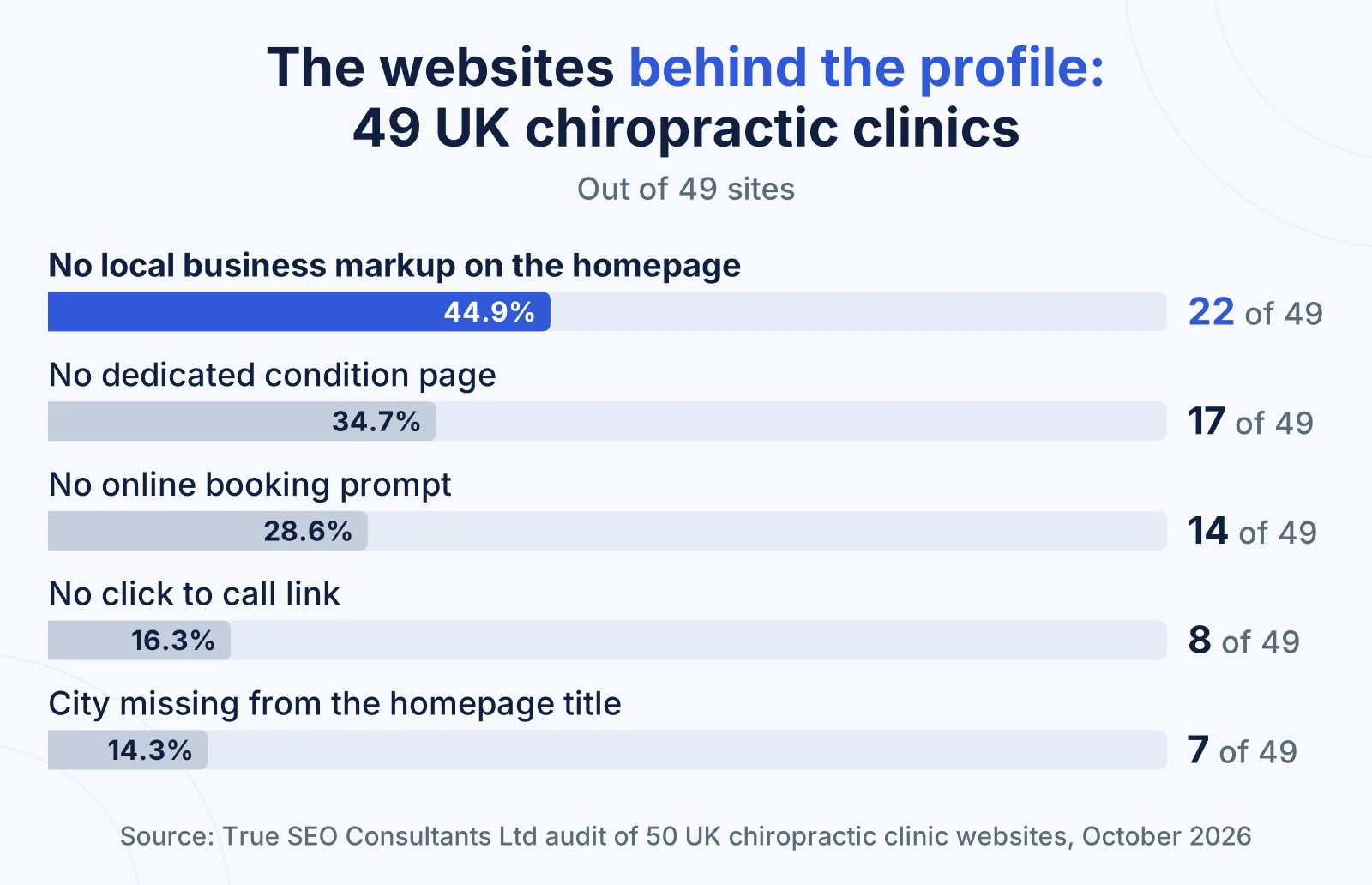
Our audit of 50 UK chiropractic clinic websites found gaps on the pages a profile sends patients to: 22 of 49 homepages carry no local business markup, the behind the scenes details that tell Google facts such as opening hours.
We checked 50 clinic websites across ten UK cities on 13 October 2026, five per city. One site blocked our content checks, so these figures are out of 49 sites. The audit measured what each website publishes. It did not measure rankings, traffic or enquiries. The method and every figure are set out in our audit of 50 UK chiropractic websites, and the full report (Research Report TSC-2026-02) and anonymised data are published with DOI 10.5281/zenodo.23363411.
Four findings bear directly on the profile, because its website link lands on these pages:
- 22 of 49 homepages (44.9%) carry no local business markup (LocalBusiness structured data). Google’s documentation says this markup lets a business tell Google about its opening hours and other details directly.
- 14 of 49 sites (28.6%) show no online booking prompt. A patient who taps through from the profile outside opening hours has no way to book until the clinic calls back.
- 8 of 49 sites (16.3%) have no click to call link. The profile has a call button, but a patient on the website has to copy the number by hand.
- 7 of 49 sites (14.3%) leave the city out of the homepage title. The page title is one of the sources Google uses for the headline it shows in search results, and the town in it tells a local patient the clinic serves their area.
The condition page gap
17 of 49 sites (34.7%) had no dedicated condition page, which leaves any condition listed as a profile service with only the homepage behind it; our guide to building condition pages for a chiropractic website covers which pages to build.
How should a multi site clinic or a team of chiropractors set up profiles?
A multi site chiropractic clinic needs one Google Business Profile per staffed location, each with its own local phone number and website page, because Google’s guidelines say “Do not create more than one page for each location of your business”.
Google’s rules for individual practitioners decide the rest. A chiropractor can have a separate practitioner profile when they work in a public facing role and can be contacted at the verified location during stated hours. Each situation has a set up Google describes:
| Situation | Profile set up in Google’s guidelines |
|---|---|
| One clinic, several chiropractors | One profile for the clinic, plus a practitioner profile for each public facing chiropractor, titled with “only the name of the practitioner” |
| One chiropractor trading under a clinic brand | A single profile named in the format “[brand/company]: [practitioner name]” |
| Several clinic locations | One profile per location; 10 or more profiles from the same business can be verified in bulk |
| A separate public facing department, such as physiotherapy | Its own profile, with a name and category different from the main clinic |
| Reception and support staff | No profile: “Support staff should not create their own Business Profiles” |
| A chiropractor with several specialisms | One practitioner profile, not one per specialism |
Google allows practitioner profiles to “include title or degree certification”. A chiropractor who uses Dr on a profile still has to make clear they are not a registered medical practitioner, as our guide to the Dr title and the GCC number on a clinic website explains.
What does a weekly profile routine look like?
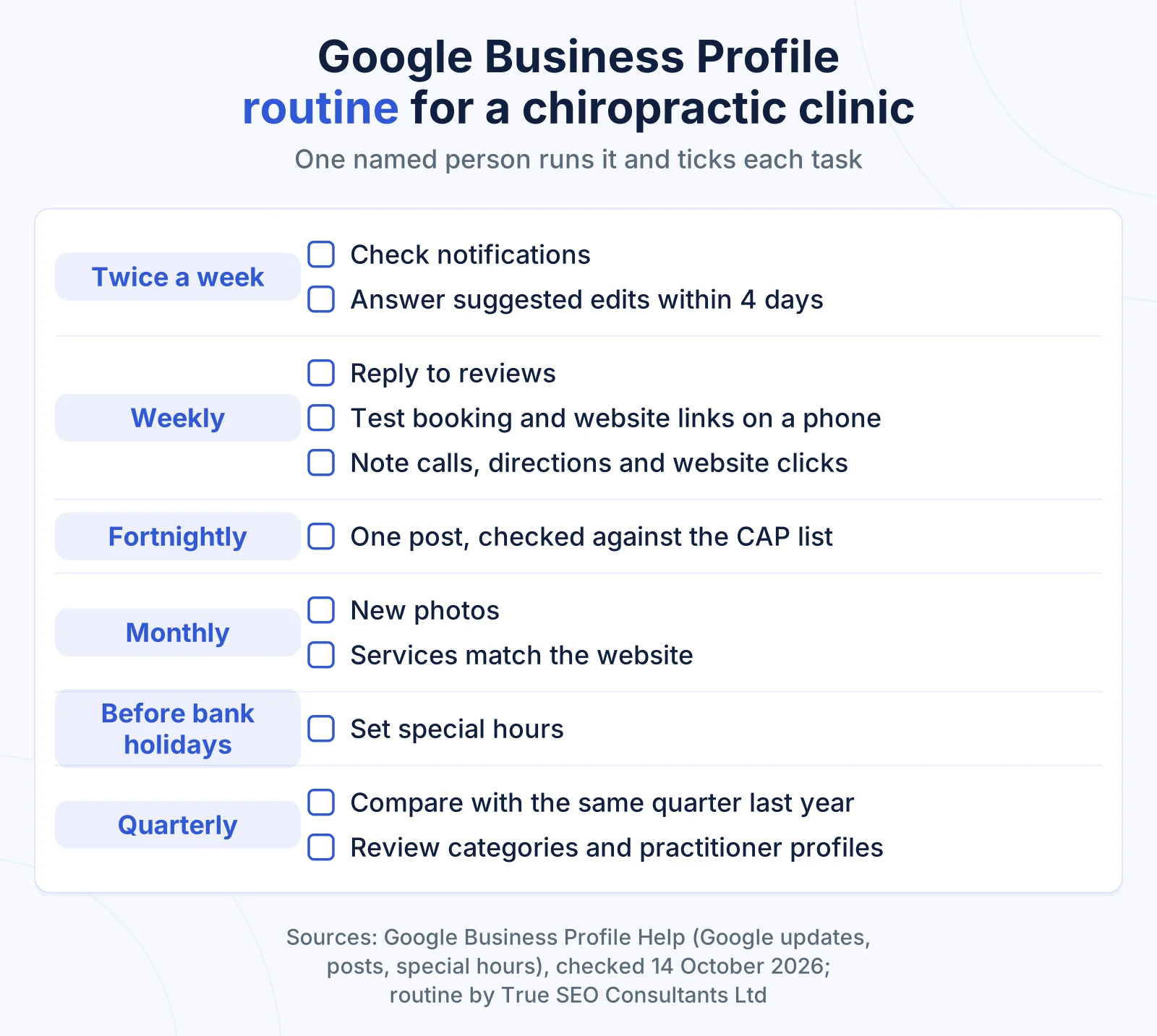
A weekly Google Business Profile routine for a chiropractic clinic takes one named person, usually the clinic manager, through reviews, Google updates, the booking link and posts, with monthly and quarterly checks on photos, services and categories.
Google’s four day window on suggested edits means notifications need checking more than once a week. The rest fits a weekly slot.
| When | Task |
|---|---|
| Twice a week | Check profile notifications and accept or reject any suggested edits within four days |
| Weekly | Reply to new reviews. Test the booking link and website link on a phone. Note calls, direction requests and website clicks |
| Fortnightly | Publish one post with one fact and one action, checked against the CAP list |
| Monthly | Add new photos. Check the services list matches the website. Answer any visible questions |
| Before bank holidays | Set special hours for each closed or shorter day |
| Quarterly | Compare figures with the same quarter last year. Review categories and practitioner profiles after any staff change |
A profile with no named owner drifts: hours go stale, reviews go unanswered and old booking links stay live. Our local SEO service for single site and multi site clinics runs this routine for each location, with one report covering all of them.
How do you know whether the profile brings in patients?
A chiropractic profile is measured by the actions patients take from it: calls, direction requests, website clicks and bookings, which Google reports in the profile’s performance report, with views read last because they count people, not patients.
Google’s performance page defines each figure:
- Calls count “the number of times a customer clicked on the call button”.
- Directions count how many people asked for directions to the clinic.
- Website clicks count clicks on the profile’s website link.
- Bookings count completed bookings, and need a booking provider.
- Views count unique visitors, at most once per person per day.
Two habits turn those figures into patients. Add a source question at booking, “How did you hear about us?”, with Google Maps as its own answer. Compare each month with the same month last year, so a seasonal rise does not read as progress.
The profile wins the map results, and the website wins the searches around them: condition searches, cost questions and patients outside the clinic’s immediate area. Our SEO service for chiropractors builds the profile, the location pages and the condition pages together and reports bookings by page. The proof we can show comes from other sectors: a Cardiff local client reached 44 first page rankings, nine of them at position one. That is evidence for the method, not a chiropractic result.
Check your own website
Answer all 8 questions about your own website, then select See my result.
Please answer all 8 questions to see your result.
Your score: 0 out of 16
Your profile needs a full set up
Several basics that shape where your clinic appears on Google Maps are missing or unchecked. Start with the category, the name and the booking link, then check the website your profile links to.
Your score: 0 out of 16
The foundations are there, with gaps
Your profile covers the basics, but routine tasks such as posts, review replies and suggested edits are not yet steady. Give one person the weekly routine and check your services against the CAP list.
Your score: 0 out of 16
Your profile is well run
Your profile follows Google’s guidelines and has a named owner. The next gain usually sits on the website behind it, so check that your condition pages and claims match what the profile says.
Frequently asked questions
Is a Google Business Profile free for a chiropractic clinic?
Yes. Google states that “creating a Business Profile and listing your business on Google is free”. The cost to the clinic is staff time for the weekly routine. Google also says there is no way to request or pay for a better local ranking, so decline any service that offers to sell one and ask what work it will do instead.
Do we need to verify the profile before posts and review replies appear?
Yes. Google’s help pages say posts stay pending while a profile is unverified, and that a business must verify its profile before it can reply to reviews. Verification confirms the clinic manages the listing at that address. Complete it before you write posts or plan a review routine, so the work you put in reaches patients.
Can Google change details on our profile?
Yes. Google says it may update a profile from sources such as user reports and licensed content. Where a suggested edit needs your review, you get four days to accept or reject it, after which Google may publish it if other public information supports it. Changed details show in blue text in the profile editor.
How long does a reply to a Google review take to appear?
A reply to a Google review is checked against Google’s content policies before it is posted. Google says the check usually takes about 10 minutes and can sometimes take up to 30 days. The reply then appears under the review as coming from the business, without the name of the person who wrote it.
Can prices go on a chiropractic clinic’s profile?
Prices can go in the service details, where Google allows descriptions and prices, but not in a custom service name, where Google says to avoid them. The business description must not focus on prices or promotions. A first appointment fee and a follow up fee in the service details answer the cost question before a patient rings.