Chiropractic website condition pages are pages that each cover one condition a clinic treats, such as back pain or sciatica, so a patient who searches for that condition finds a page that answers them. In the UK, each page should cover a condition on the CAP accepted list, use CAP’s wording and name the registered chiropractor who sees those patients.
Key points
- Build condition pages only for conditions on the CAP accepted list that your clinic treats. Grouping close entries usually gives six to eight pages.
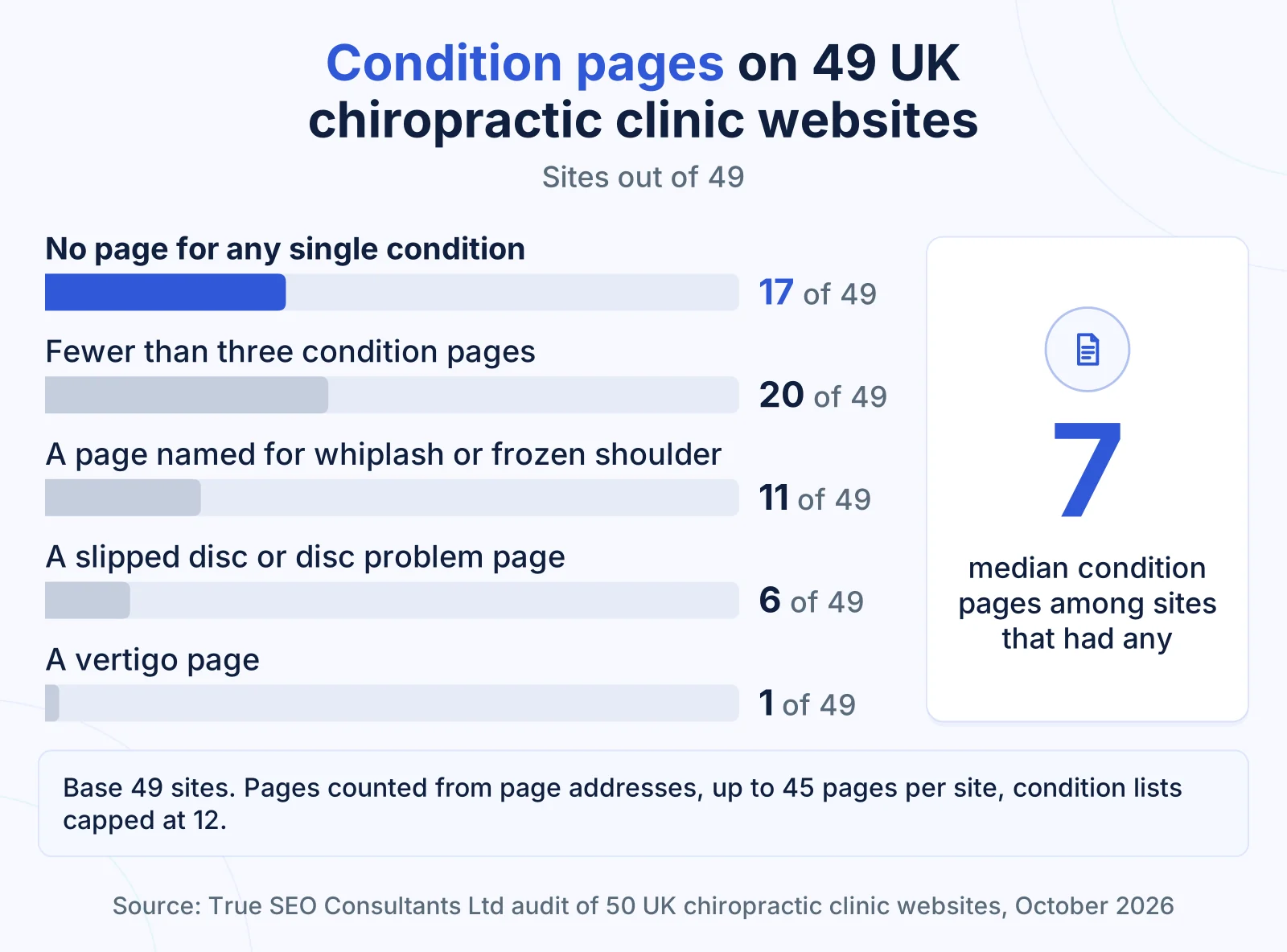
- In our audit of UK clinic websites, 17 out of 49 sites had no page for any single condition.
- Every condition page needs a clear main heading, a plain definition, what happens at the first appointment, a GP referral line, a named chiropractor, a reviewed date and a booking button.
- Whiplash, frozen shoulder, colic and morning sickness do not get condition pages unless the clinic holds its own strong body of evidence.
- Describe the clinic to Google with MedicalClinic or MedicalBusiness markup. “Chiropractor” is not a type schema.org defines.
- Link each condition page to the chiropractors who treat it and the clinics where it is treated, and link back the other way.
What is a condition page on a chiropractic website?
A condition page on a chiropractic website is a page about one accepted condition, or a close group of them, that explains the condition, the first appointment and which registered chiropractor sees those patients, ending with a way to book.
A condition page sits alongside the home page, clinician profiles, location pages, prices, a first visit page and booking. The full page plan for a clinic is set out on our SEO service for chiropractors page; this guide covers condition pages from the choice of conditions to the markup behind them.
Three other page types get mistaken for condition pages:
| Page type | What it does | Is it a condition page? |
|---|---|---|
| “Conditions we treat” index | Lists every condition and links to each page | No. It leads to them |
| Blog article on a condition | Answers one narrower question, such as what a first lumbago assessment involves | No. It supports the condition page |
| Technique page | Describes a method the clinic uses | No. The CAP list names conditions, not techniques |
A patient typing “chiropractor for sciatica” and a town wants one page that answers that search. Google’s Business Profile help says local results are based mainly on relevance, distance and popularity, and a site without a sciatica page has only its homepage to offer for the relevance part.
How many UK clinic websites have condition pages?
Condition pages are missing from about a third of UK chiropractic clinic websites: in our audit, 17 out of 49 sites had no page for any single condition, and 20 out of 49 had fewer than three.
The figures come from our audit of 50 UK chiropractic websites, five clinic sites in each of ten cities, checked on 13 October 2026. The full report (Research Report TSC-2026-02) and the anonymised data are published with DOI 10.5281/zenodo.23363411.
| What we found | Sites with it |
|---|---|
| No page for any single condition | 17 out of 49 |
| Fewer than three condition pages | 20 out of 49 |
| Median number of condition pages, among sites that had any | 7 |
| A page whose address, title, heading or menu label names whiplash or frozen shoulder | 11 out of 49 |
| A slipped disc or disc problem page | 6 out of 49 |
| A vertigo page | 1 out of 49 |
| Pages with no clear main heading (H1) on the site | 30 out of 50 |
| Pages on the site without the short summary Google shows under a result (meta description) | 40 out of 50 |
For a clinic, the first row means a patient searching for a condition and a town finds no page on those sites built for that search, and the second shows how thin coverage is on many more. The whiplash and frozen shoulder row matters because both conditions sit outside the CAP accepted list, which makes those pages the most exposed to a challenge, and any visibility a page earned goes when it is withdrawn. The last two rows are set in the page template, so one fix covers every condition page.
Two limits apply. We counted condition pages from page addresses across up to 45 pages per site, with condition lists capped at 12, so the median of 7 is a floor and large sites may have pages we did not see. The audit measured what clinics publish. It did not measure rankings, visits or enquiries, and it does not assess whether any site complies with the CAP Code or GCC standards.
Which conditions should get their own page?
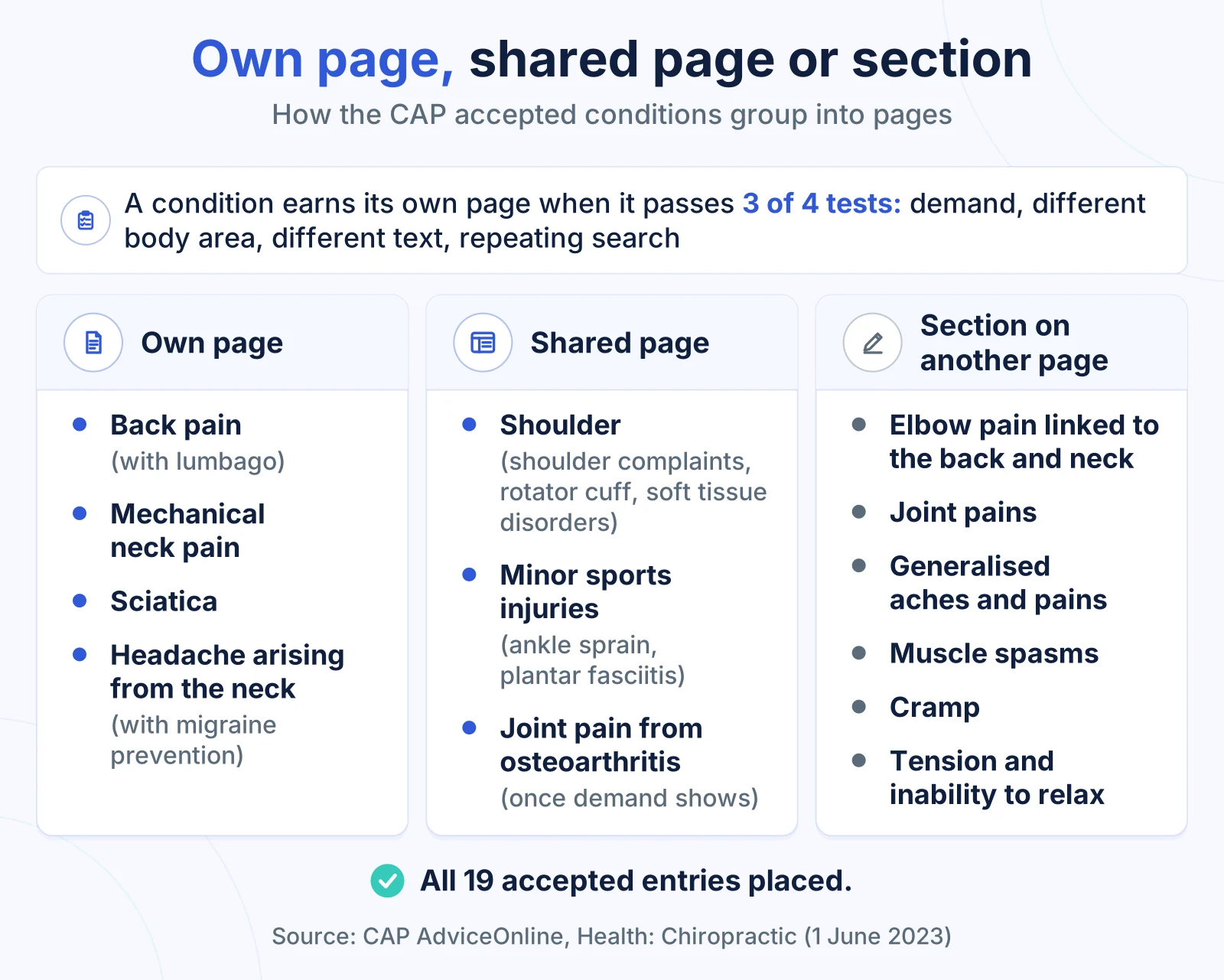
A condition gets its own page when it is on the CAP accepted list, your clinic treats it, and it passes three of four tests: patients search for it, it covers a different body area, its text differs, and its searches repeat.
The CAP list sets the boundary. CAP AdviceOnline names 19 accepted entries for chiropractors, and any other condition needs strong clinical evidence held by the clinic. The four tests then decide which entries become pages and which become sections:
- Demand. Patients search for the condition by name, often with “chiropractor for” or a town. Search Console and Google Keyword Planner show this before you write.
- Different body area or nerve. The page covers anatomy, symptoms or an assessment your other pages do not.
- Different text. The page would not repeat most of another page with only the condition name changed.
- A repeating pattern. Patients search it in a shape many share, such as “chiropractor for [condition] in [town]”.
These tests come from the topical authority method we use to plan a site. Applied to the 19 entries, they usually produce this plan:
| Accepted entries (CAP wording kept) | Decision | Reason |
|---|---|---|
| General, acute and chronic backache, back pain (not arising from injury or accident), plus lumbago | Own page, lumbago as a section | The broadest accepted entry; lumbago shares the anatomy |
| Mechanical neck pain (not neck pain following injury) | Own page | Different anatomy and a different exclusion |
| Sciatica (general references, as opposed to pain reduction claims) | Own page | A distinct nerve and a distinct search |
| Headache arising from the neck (cervicogenic), plus migraine prevention | Own page, migraine prevention as a section | Headache searches differ from neck searches |
| Shoulder complaints (not frozen shoulder), rotator cuff injuries, disease or disorders, soft tissue disorders of the shoulder | One shoulder page | Three entries share one body area |
| Minor sports injuries, ankle sprain (short term management), plantar fasciitis (short term management) | One minor sports injuries page | One audience; each condition gets a section |
| Joint pains including hip and knee pain from osteoarthritis, as an adjunct to core OA treatments and exercise | Own page once demand shows, otherwise a section | The adjunct wording stays either way |
| Elbow pain and tennis elbow arising from associated musculoskeletal conditions of the back and neck | Section on the neck or back page | Accepted only where linked to the back and neck |
| Joint pains, generalised aches and pains, muscle spasms, cramp, tension and inability to relax | Sections on one “other conditions we treat” page | Broad terms that overlap heavily |
That plan gives six to eight pages, close to the median of 7 our audit found among sites that had any. Cramp shows why the tests matter: it is on the list, but a standalone cramp page would repeat most of the sports injuries copy.
What goes on a single condition page?
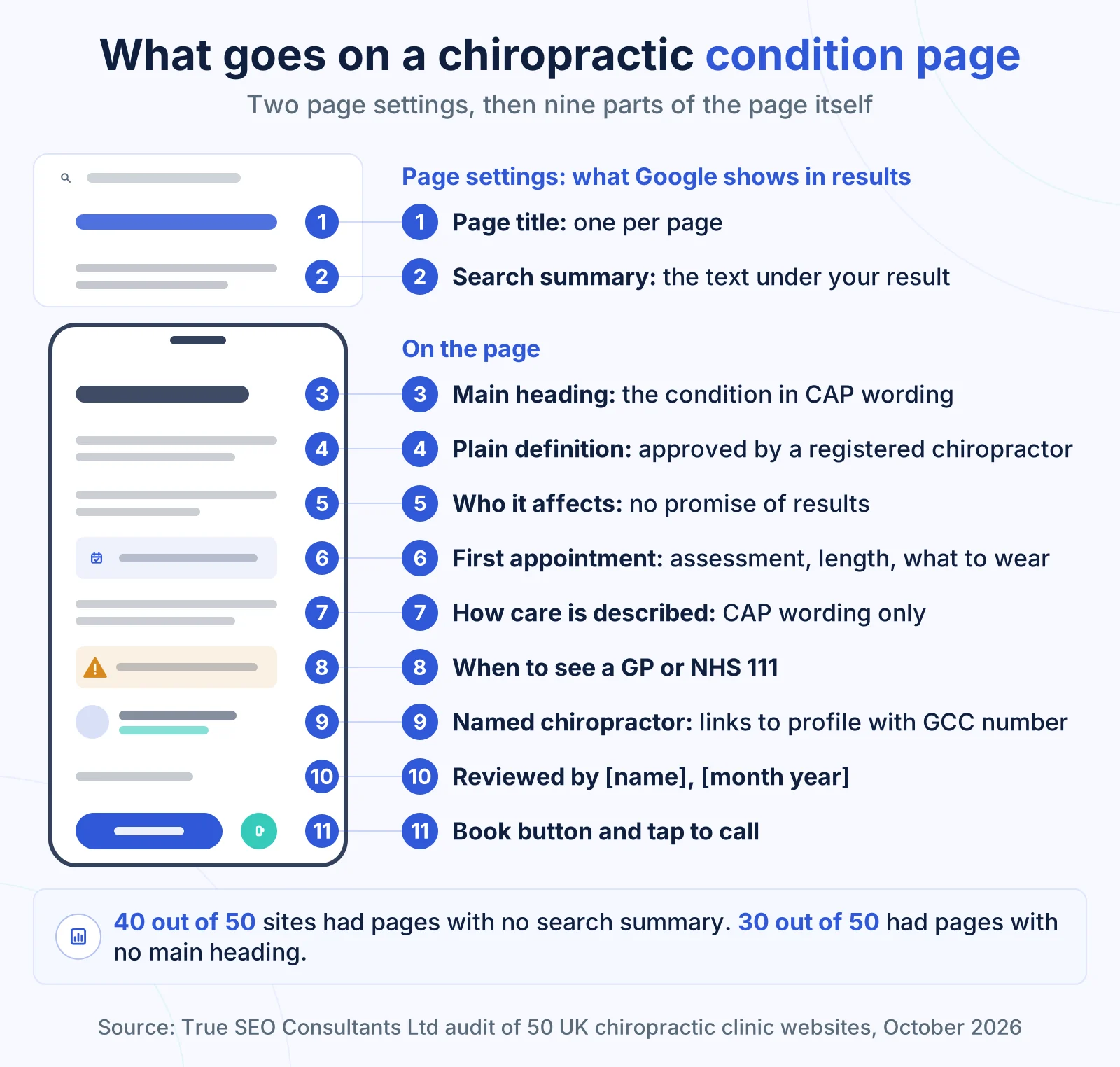
A chiropractic condition page needs nine parts in this order: a main heading, a plain definition, who it affects, the first appointment, how care is described, when to see a GP, the named chiropractor, a reviewed date and booking.
- Main heading. One heading at the top, naming the condition in CAP’s wording, for example “Sciatica: chiropractic assessment and care in Leeds”. A single site clinic can name its town here; a group puts towns on location pages.
- Plain definition. One or two sentences a patient understands on first read, such as “Sciatica is pain that travels from the lower back or buttock down the back of the leg, along the sciatic nerve.” A registered chiropractor writes or approves this sentence.
- Who it affects. The patients your clinic sees with this condition, by age group, work or activity, with no promise about results.
- The first appointment. What the assessment covers, how long it takes and what to wear, with a link to your first visit and prices pages.
- How care is described. What the chiropractor does, in the wording CAP accepts for this condition. The next section covers this part line by line.
- When to see a GP instead. A short list of signs your chiropractors refer on, written by them, naming the GP or NHS 111 as the next step.
- The named chiropractor. Who sees these patients, linked to their profile, where the GCC registration number sits.
- Reviewed date. A line such as “Reviewed by [name], registered chiropractor, [month and year]”.
- Booking. One booking button and a phone number a patient can tap to call from a mobile.
Each condition page also has to work on a phone. Ofcom’s 2026 media use survey found 20% of online adults rely solely on a smartphone to go online, so the page has to load quickly and keep the booking button in reach on a small screen.
Two parts sit in the page settings rather than the copy. Each condition page needs its own title, and its own short summary that Google can show under the result. Google Search Central says it sometimes uses that summary for the snippet, and our audit found 40 out of 50 sites had pages without one.
Length follows the content: the nine parts for one condition, with nothing added to reach a word count. Each page follows the same answer first pattern as our guide to writing service pages that answer engines can quote: the answer in the first sentence, then the detail.
How do you word a condition page inside the CAP rules?
A condition page stays inside the CAP rules when every heading and line names the accepted condition in CAP’s terms, describes what the chiropractor does rather than how the patient will feel, and makes no claim the clinic cannot evidence.
The rules reach the clinic website as well as its ads. According to CAP AdviceOnline, the CAP Code has applied to marketing on a business’s own website since 2011. The GCC Code of Professional Practice, in force since 1 January 2026, requires in standard C5 that information a chiropractor gives about their services is factual, verifiable and does not mislead, and the GCC’s mapping document places CAP Code compliance under standard C4. This guide describes the published rules. This is not legal advice.
Condition pages carry the risk in four places: the heading, the opening line, the qualifier and the booking line.
| Page part | Wording that goes beyond the list | Wording inside the list |
|---|---|---|
| Main heading | “Whiplash treatment in Cardiff” | “Mechanical neck pain: chiropractic care in Cardiff” |
| Opening line, sciatica page | “We get rid of sciatica fast.” | “Our chiropractors see and treat patients with sciatica.” |
| Qualifier, knee page | “Chiropractic instead of knee surgery” | “Chiropractic care for knee pain from osteoarthritis, alongside your core osteoarthritis treatment and exercise” |
| Booking line | “Book now and be pain free” | “Book a first assessment with [chiropractor’s name]” |
In every row, the left wording promises an outcome or names a condition the list leaves out, and the right wording names the accepted condition with its qualifier and says what the clinic does.
Patient quotes are the fifth place, and the one most often missed. The ASA says claims in testimonials, including implied claims, need the same evidence as a claim the clinic makes itself, so a quote about recovering from whiplash on your neck pain page counts as an implied whiplash claim. Read what the rules allow for testimonials on a condition page before you place one.
Which condition pages should a chiropractor not build?
A chiropractor should not build condition pages for whiplash, frozen shoulder, colic or morning sickness, or for any other condition outside the CAP accepted list, unless the clinic holds its own strong body of clinical evidence for the claim.
CAP’s accepted entry for mechanical neck pain excludes neck pain following injury, which is whiplash, and the shoulder entry excludes frozen shoulder by name. For babies, children and pregnant women, CAP accepts references to treating the population group but says conditions specific to them, with colic and morning sickness as its examples, are unlikely to be acceptable without a strong body of evidence. The detail on each exclusion, with the reasons, is in our guide to what a chiropractor can claim to treat.
Our audit also found 6 out of 49 sites with a slipped disc or disc problem page and 1 with a vertigo page, two conditions the CAP list does not name.
A page that already exists needs two decisions, one about the page and one about its address:
| Existing page | What to do with the page | What to do with its address |
|---|---|---|
| Whiplash | Remove it. Mechanical neck pain gets its own page under the accepted wording | Redirect it permanently to your conditions index page, or let it return a not found status |
| Frozen shoulder | Remove it. Shoulder complaints get one shoulder page that never names frozen shoulder as treated | Redirect it permanently to your conditions index page, or let it return a not found status |
| Slipped disc, disc problems, vertigo | Remove it, unless the clinic holds its own evidence | Redirect it permanently to your conditions index page, or let it return a not found status |
| Colic, morning sickness | Remove it. A pregnancy or babies page about accepted conditions can stay | Let it return a not found status |
| Any of the above | Update every menu item and internal link that pointed at it | Check that no link on your site now leads to an error page |
Send these addresses to the index page rather than to one accepted condition page, so a patient searching for whiplash is not led to a page that appears to answer that search. Google Search Central recommends a permanent server side redirect whenever possible and does not index addresses that return a 4xx status. The last row matters: our audit found 20 out of 50 sites had links on their own pages leading to error pages.
How should condition pages link to clinician and location pages?
Condition pages should link to the chiropractors who treat that condition and the clinics where it is treated, and each profile and location page should link back, so a patient moves from problem to person to place in two clicks.
| From | Links to | Link text to use |
|---|---|---|
| Condition page | The chiropractor who sees these patients | Their full name |
| Condition page | Each clinic location that treats it | The town or district |
| Condition page | One closely related condition page only | The condition name, such as “sciatica” from the back pain page |
| Clinician profile | Each condition they see | The condition names patients use |
| Location page | Conditions treated at that site, and the clinicians there | Condition names and clinician names |
| Every page above | Booking | The same button wording everywhere |
Link two condition pages only where the content overlaps, such as back pain and sciatica. A link from every condition page to every other adds clutter and hides which pages belong together.
Keep one set of condition pages for the whole clinic. A group with three sites does not need “sciatica Leeds”, “sciatica Harrogate” and “sciatica York” as separate pages. Google’s spam policies name “pages targeted at specific regions or cities that funnel users to one page” as doorway abuse. The town belongs on the location page, and the condition page links to every location that offers it.
The clinician profile is where the GCC registration number and any Dr title wording sit, and our guide to what a chiropractor’s profile page should show covers that page in full.
Which behind the scenes markup (schema) should a chiropractic website use?
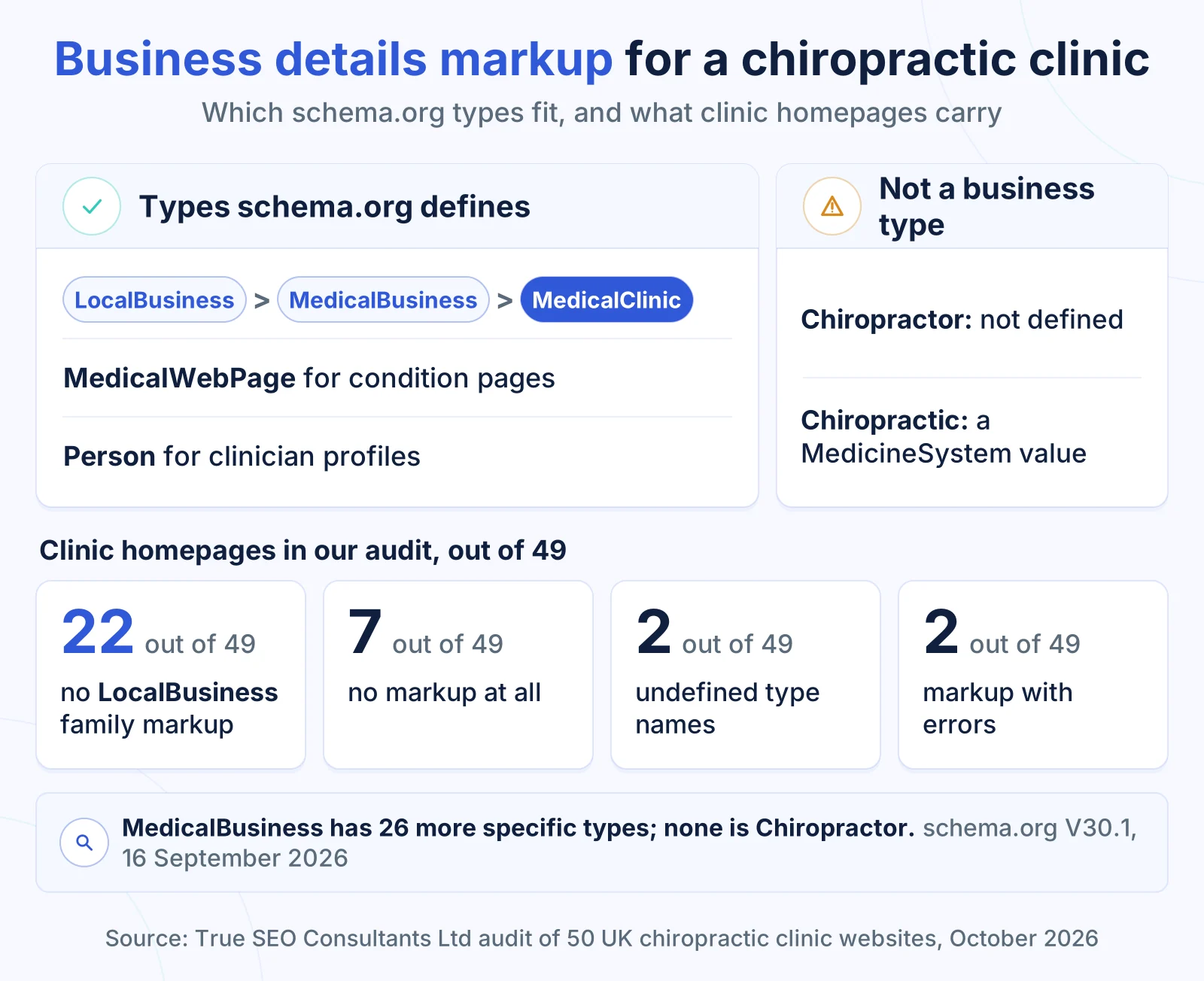
A chiropractic website should describe each clinic with MedicalClinic or MedicalBusiness markup, both types schema.org defines inside the LocalBusiness family, give every location its own entry, and mark up only the facts the visible page already shows.
This markup sets out the business details Google reads, such as the clinic name, address, phone number and opening hours, in the page code. Google’s documentation says it uses structured data to understand the content of a page and recommends the JSON-LD format.
Several guides name types that do not exist. As schema.org defines them today:
- Chiropractor is not a schema.org type. It does not appear among the 26 more specific types of MedicalBusiness, which include MedicalClinic and Physiotherapy.
- Chiropractic is not a business type either. It is one value in the MedicineSystem list, beside Osteopathic and Homeopathic, and the property that uses it applies to medical topics such as a therapy, not to a clinic.
- MedicalClinic sits under LocalBusiness and MedicalBusiness. Google’s local business documentation says to “use the most specific LocalBusiness sub-type possible”, and MedicalClinic is the most specific defined type that fits a chiropractic clinic.
- The specialty list has no Chiropractic value. MedicalClinic accepts a medical specialty, and Musculoskeletal is the closest value schema.org lists. Leaving the specialty out is also fine.
Our audit found the gap on clinic homepages. 22 out of 49 carried no business details markup from the LocalBusiness family, and 7 out of 49 carried no markup of this kind at all. Separately, 2 out of 49 used type names schema.org does not define as business types, and 2 out of 49 had markup with errors that stopped it being read.
| Page | Markup type | What to fill in |
|---|---|---|
| Single site homepage, or each location page | MedicalClinic | name and address (Google requires both), telephone, url, opening hours, geo coordinates, priceRange (under 100 characters) |
| Clinician profile | Person | name, jobTitle, the GCC registration number as an identifier, worksFor the clinic; honorificPrefix “Dr” only where the visible page shows the Doctor of Chiropractic wording beside it |
| Condition page | MedicalWebPage | about (the condition), lastReviewed (the reviewed date), reviewedBy (the chiropractor named on the page) |
Each location gets its own entry, because Google’s documentation says to define each local business location as a LocalBusiness type, and the name, address and phone in it should match the Google Business Profile for that clinic word for word. A minimal entry for one location looks like this, with your own details in place of the brackets:
{
  "@context": "https://schema.org",
  "@type": "MedicalClinic",
  "name": "[Clinic name]",
  "url": "[Address of this location page]",
  "telephone": "[Clinic phone number]",
  "address": {
    "@type": "PostalAddress",
    "streetAddress": "[Street]",
    "addressLocality": "[Town]",
    "postalCode": "[Postcode]",
    "addressCountry": "GB"
  },
  "openingHoursSpecification": [{
    "@type": "OpeningHoursSpecification",
    "dayOfWeek": ["Monday", "Tuesday", "Wednesday", "Thursday", "Friday"],
    "opens": "[Opening time]",
    "closes": "[Closing time]"
  }],
  "priceRange": "[First visit and follow up price range]"
}
Google’s general structured data guidelines say “don’t mark up content that is not visible to readers of the page” and that markup “must be a true representation of the page content”, so a condition never appears in markup unless the page treats it under the accepted wording. Reviews on your own site do not earn review stars: Google treats LocalBusiness pages carrying the business’s own reviews as ineligible. FAQ markup no longer earns anything visible either, since FAQ rich results stopped appearing from 7 May 2026. Google’s general guidelines also state there is no guarantee that structured data will show up in search results, so treat it as a description of the clinic, not a shortcut to a higher position.
In what order should a clinic build its condition pages?
A clinic should build condition pages in four stages: plan them against the CAP list and deal with excluded pages, publish the pages they link to, add one condition page a week, then add markup and check every page.
| Weeks | What to build | Why it comes here |
|---|---|---|
| 1 | List the conditions you treat against the CAP list, apply the four tests, and decide what happens to any existing whiplash, frozen shoulder, disc or colic page | The plan fixes how many pages you need and which addresses change |
| 2 | Clinician profiles, at least one location page, the first visit page and the prices page | Every condition page links to these, so they need to exist first |
| 3 to 6 | Back pain, mechanical neck pain, sciatica and headache arising from the neck, one a week | These four usually pass the tests most clearly |
| 7 to 8 | The shoulder page, the minor sports injuries page and, where demand shows, the osteoarthritis joint pain page | Grouped pages follow once the single condition pages set the pattern |
| 9 | The “other conditions we treat” page and the conditions index page | The index needs pages to link to |
| 10 | Markup on every page, a check of headings and search summaries, and a Search Console check of which pages are indexed | Markup describes finished pages |
One page a week gives a registered chiropractor time to sign off each page before it goes live. The work in week 10 is the same page level checking we carry out in technical and on page SEO, where headings, summaries, markup and links are checked against the visible copy.
Set a review date on every condition page once it is live, and reread the pages whenever CAP or the GCC changes its guidance. CAP updated its advice on chiropractors’ use of the term Dr on 15 July 2026, and a change like that can touch every page that names a chiropractor.
Check your own website
Answer all 8 questions about your own website, then select See my result.
Please answer all 8 questions to see your result.
Your score: 0 out of 16
Your condition pages need building
Your site is answering condition searches with the homepage or pages a patient cannot act on. Start with week 1 of the build order above, or send us your website address for a free written list of the condition pages you can build.
Your score: 0 out of 16
The pages exist, the gaps are fixable
You have condition pages, but headings, summaries, reviewed dates or links are missing on some of them. A free claim check lists every gap page by page so your developer can work through it.
Your score: 0 out of 16
Your condition pages are in good shape
Your pages cover the accepted conditions, name your chiropractors and give patients a way to book. Keep the reviewed dates current and reread the pages each time CAP or the GCC updates its guidance.
Frequently asked questions
Should a chiropractic website organise its pages by condition or by technique?
A chiropractic website should organise its main pages by condition, because the CAP accepted list, the clinic’s claims and searches such as “chiropractor for sciatica” all name the condition rather than a technique. A technique the clinic uses can be described inside each condition page, or on one page about how the clinic works, linked from the condition pages that use it.
Should a condition page name the town?
A single site clinic can name its town in the main heading and title of each condition page, because the page and the clinic serve the same area. A clinic with several sites keeps one condition page per condition and names each town on its own location page. Separate copies of the same condition page for each town fall under Google’s description of doorway pages.
Does a clinic need a “conditions we treat” page as well as the condition pages?
A clinic benefits from one “conditions we treat” index page that lists every accepted condition it sees and links to each condition page or section. It gives patients and Google one route to every condition, and it is where the accepted entries without their own page, such as cramp or muscle spasms, can sit as short sections.
Who should write a chiropractic condition page?
A registered chiropractor at the clinic should write or approve the clinical parts of every condition page: the definition, who it affects, the assessment and the signs that mean a patient should see a GP. A writer can shape the page, but the chiropractor named on it signs it off, and the reviewed line on the page records who did and when.
Does schema markup get a clinic into AI answers?
Schema markup does not guarantee a place in search results or AI answers, and Google states it does not guarantee that structured data will show up in its results. What markup does is set out the clinic’s name, address, hours and chiropractors in a form Google uses to understand the page, so Google reads the same facts your Google Business Profile shows, provided the details match.