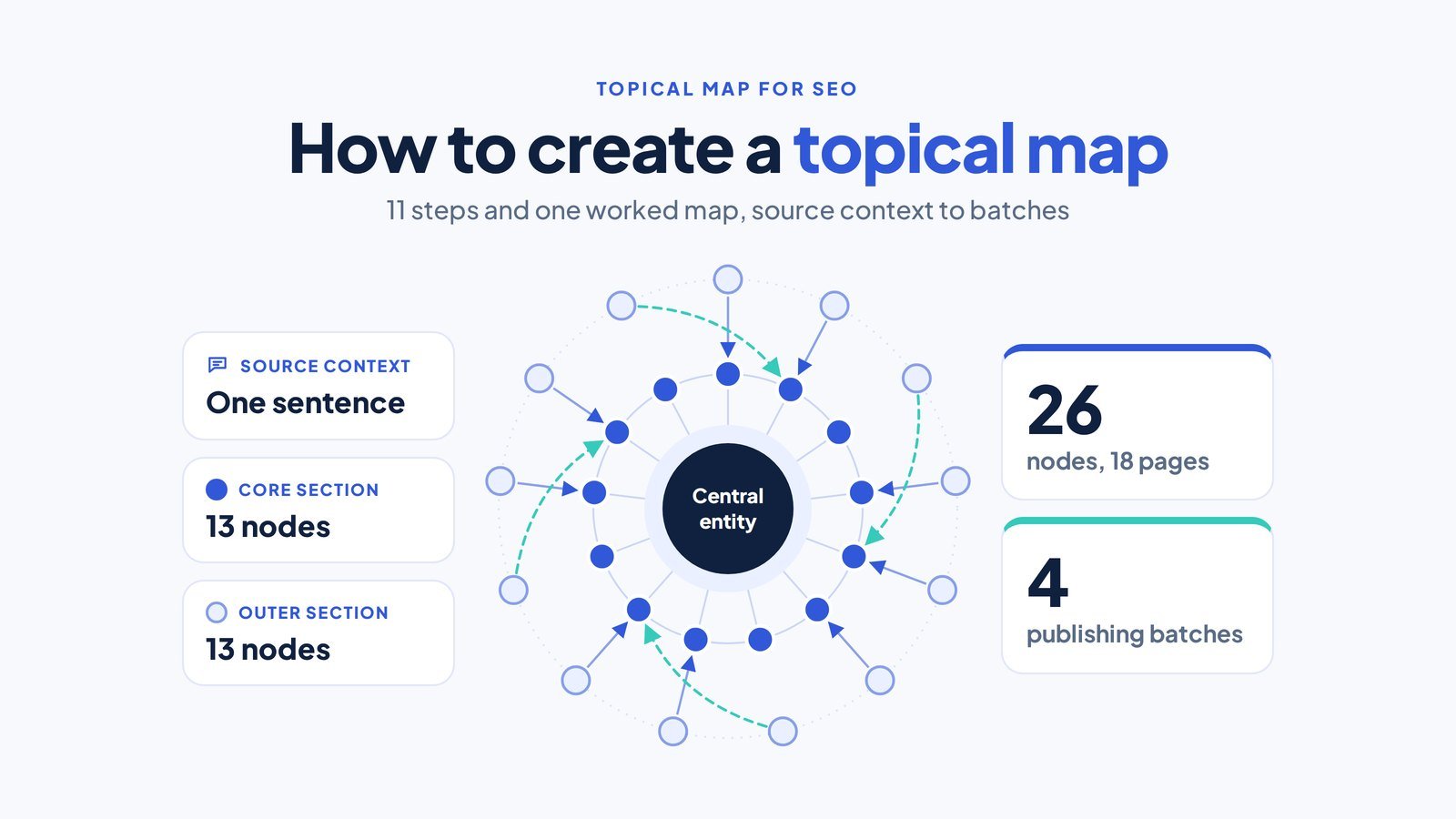
You create a topical map by writing your source context, choosing your central entity and search intent, listing every entity of that type with its attributes, turning searches into query templates, deciding which queries deserve a page, and ordering those pages into core and outer sections that link and publish in batches.
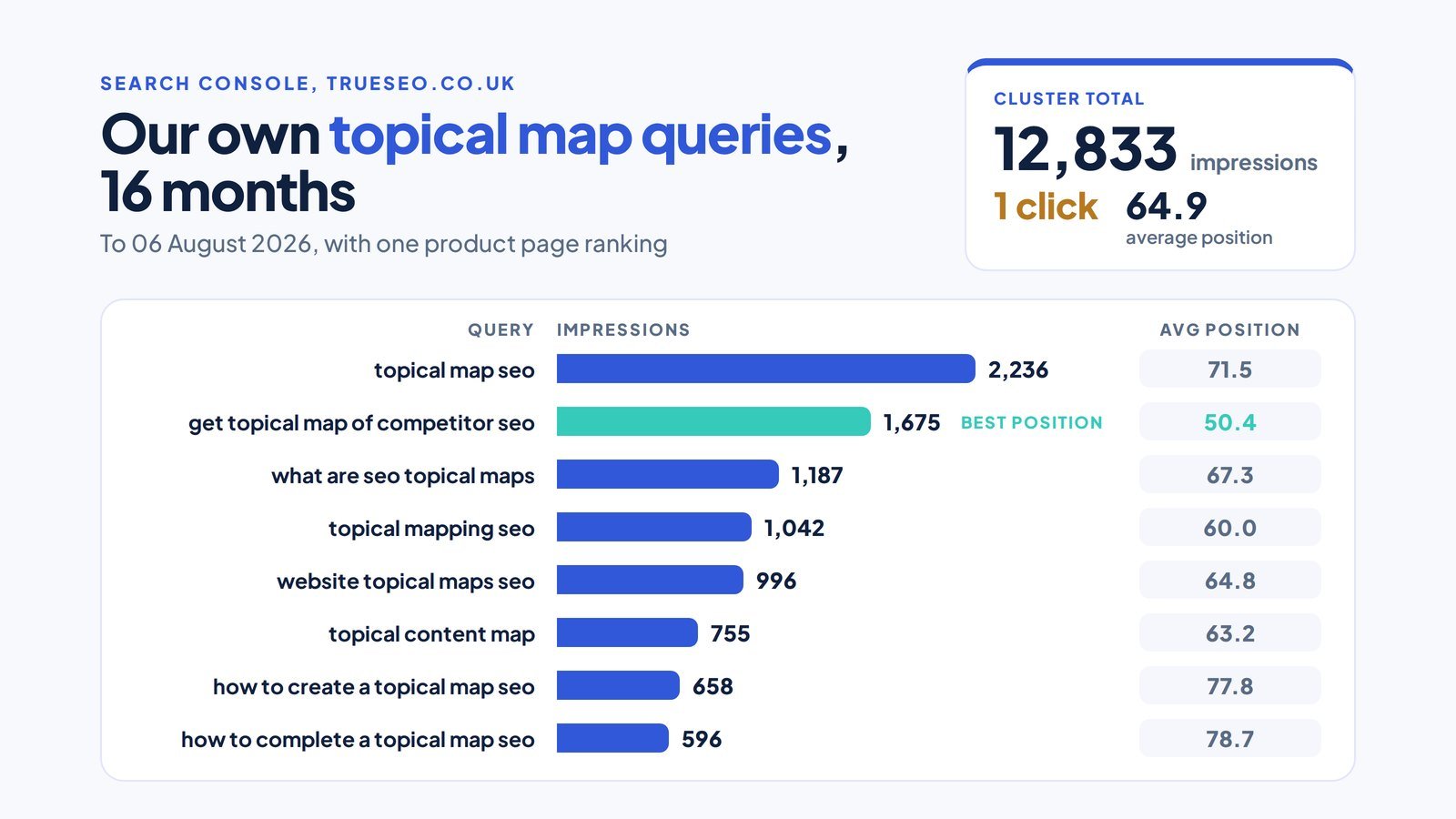
Skipping the plan is expensive: posts compete for one query, and a service page ranks for questions it can’t convert. We had exactly that problem. Our own Search Console data for the 16 months to 06 August 2026 shows our topical map query cluster, led by searches such as topical map seo and what are seo topical maps, earning 12,833 impressions and 1 click at an average position of 64.9, and the only page of ours ranking for them was a product page.
Key Takeaways
- A topical map is a build specification for every page and section your site needs, not a keyword list or a content calendar.
- The source context comes first: who you serve, what you sell, where, and how you’re paid.
- Query templates such as “[treatment] cost Cardiff” turn one search pattern into every variation you need.
- A query earns its own page when it brings a new entity or pattern and real demand; the rest become H2s, rows or FAQs.
- Commercial pages form the core section, informational pages the outer section, and links run outer to core.
- A map is complete when every entity, root attribute and template variation has a home and a parent.
- Pages go live in batches, parents before children.
Semantic SEO programme
Want your map built into rankings?
Our semantic SEO and topical authority programme plans the map, writes every node and links it in order, billed on KPIs, not hours.
Results for UK clients
Real client figures, two of them with a published case study behind them.
- 200+UK clients across about 18 sectors
- 773 to 2,300monthly organic visits, Total Books Accountants
- 44first-page rankings, Cardiff local SEO case study
How do you create a topical map for SEO?
You create a topical map for SEO in 11 steps, and each one fills a column or settles a decision in your spreadsheet.
- Write your source context in one sentence.
- Choose the central entity all your pages will mention.
- Define the central search intent in the searcher’s words.
- List every entity of the same type you sell, such as each service, treatment or product.
- Sort their attributes into root, unique and rare.
- Turn your customers’ real searches into query templates.
- Decide which variations deserve a page, an H2, a table row or an FAQ.
- Split your nodes into a core section and an outer section.
- Add contextual bridges to neighbouring entity classes.
- Give each row a parent, link targets and an exact anchor.
- Group your rows into publishing batches, parents first.
Gather five inputs before step 1: your service list with margins, a full Search Console query export, the questions customers ask on calls, two or three competitor sitemaps, and a blank Google Sheet or Excel file. Paid tools speed up the listing work, but the page and link decisions stay with you.
What are the six parts of a topical map?
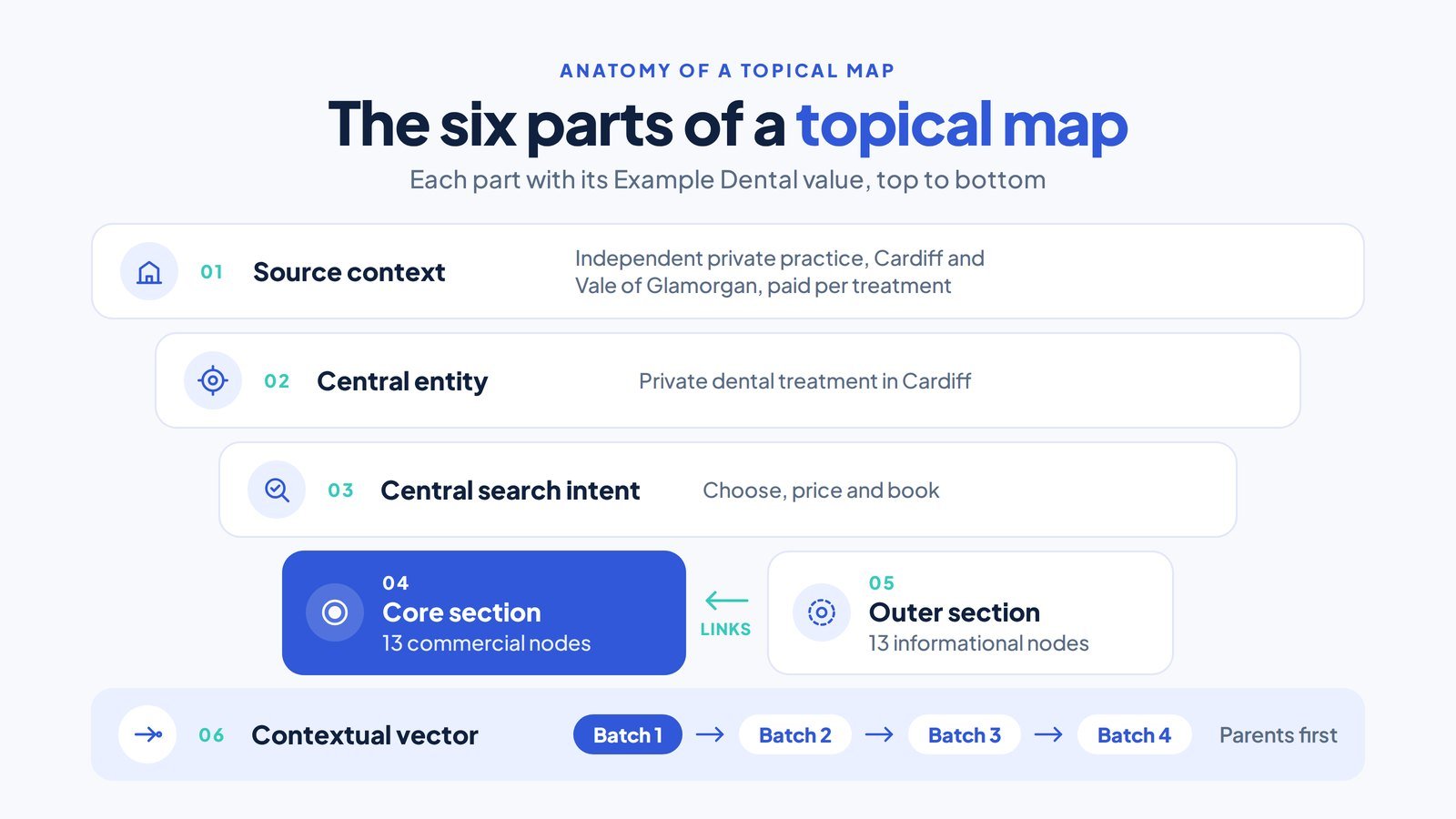
A topical map has six parts: source context, central entity, central search intent, core section, outer section and contextual vector. Together they make the map an ordered list of every page and section a site needs to cover one subject, with each entry’s entity, search intent, page level and internal links fixed before anyone writes. “Topical content map” means the same thing, and a website topical map is one drawn for the whole site rather than a single cluster. The finished pages form what the framework calls a semantic content network.
The six terms come from Koray Tugberk Gubur’s topical map framework and the practitioners who teach it; the plain-English definitions are ours. Our guide to all 94 semantic SEO terms, decoded with one example business, covers the rest of the vocabulary.
- Source context: why your site exists and how it earns money, in one sentence.
- Central entity: the single thing every section of your site is about.
- Central search intent: the job the visitor wants done, phrased the way they’d phrase it.
- Core section: the commercial pages carrying the most important entities.
- Outer section: the informational pages connecting the central entity to neighbouring topics.
- Contextual vector: the order context flows in, heading to heading on each page and page to page in the build, so each page goes live after the page it depends on.
True SEO’s semantic SEO programme builds this map before a word is written, then writes and links every node in order, so Google judges your site on a subject it covers completely.
How is a topical map different from a keyword list or a content calendar?
A topical map decides what must exist and how it connects, a keyword list records what people type, and a content calendar says when something goes live.
| Document | What it lists | What decides the entries | Page or section? | Link direction? | Publishing order? |
|---|---|---|---|---|---|
| Topical map | Every node a subject needs | Source context, entities, attributes, templates | Yes, per row | Outer to core | By dependency |
| Keyword list | Search terms with volume | Volume and difficulty | No | No | No |
| Topic cluster | One pillar and its cluster pages | A chosen pillar topic | Partly | Cluster to pillar | No |
| Content silo | Pages grouped in folders | Site navigation | No | Within the folder | No |
| Content calendar | Posts with dates | Team capacity | No | No | By date only |
| XML sitemap | URLs already published | What exists | No | No | No |
Pillar pages and topic clusters still fit inside a topical map. Each core hub, such as a dental implants page, acts as a pillar, and the H2s, comparisons and outer questions linked to it form its cluster. The map adds what a pillar plan leaves open: page level, link direction and publishing order.
Why does a topical map help you rank in Google and AI search?
A topical map helps you rank because it shows Google that your site has one clear purpose, sections it can rank as passages, and links that show which of your pages answers which query. Google’s helpful content guidance asks site owners: “Does your site have a primary purpose or focus?”
Google’s guide to ranking systems describes passage ranking as an AI system that identifies individual sections of a page, and Google said on its Keyword blog in October 2020 that passage understanding would improve 7 per cent of search queries across all languages. Our own Search Console data fits that: answer-first H2 sections on our accountancy SEO page show up as separate passage targets at positions 11.5 to 12. So assign queries to H2s as well as URLs.
Google’s link best practices call links a relevance signal and add: “Every page you care about should have a link from at least one other page on your site.” Give every row in your map a parent, and no page is left orphaned.
AI search runs on the same foundations. Google’s AI features documentation says AI Overviews and AI Mode may issue several related searches across subtopics, which it calls query fan-out, and need no special optimisation beyond foundational SEO. Your map is the list of subtopics those searches can land on. Semrush’s 2026 study of 1,094 US ChatGPT categories found brands cited in 74% of appearances in categories close to their expertise, against 50% in distant ones.
Does a small or new website need a topical map?
A small or new website needs a topical map once it plans more than a handful of pages, and only the size of the map changes. New sites, sites adding a service line and sites with flat traffic gain most, because each is deciding what to build next.
Build your map from the source context first, then fit your existing posts into it. A map drawn around the posts you already have only records old guesses.
How do you build a topical map, step by step?
You build a topical map by working the 11 steps in order, since each step’s output feeds the next. Every example uses one fictional business, Example Dental, Cardiff.
Step 1: Write the source context
Write one sentence that answers five questions: who you are, who you serve, what you sell, where, and how you’re paid. That sentence is your source context, and it decides which topics belong on the map before any keyword research starts. Koray set out source context, alongside brand identity and contextual bridges, in his Holistic SEO study “How to Expand a Topical Map for Higher Topical Authority?”.
Fill the five slots first, then join them into one sentence. Test it by reading a topic idea against it: a topic that contradicts any slot stays off the map.
Worked example: Example Dental, Cardiff
Example Dental’s source context reads: “Example Dental is an independent private dental practice in Cardiff that provides cosmetic, restorative and emergency dentistry to adults across Cardiff and the Vale of Glamorgan, paid per treatment with monthly finance available.”
- In the mapImplants, clear aligners, composite bonding, veneers, whitening, emergency care, monthly finance
- Off the mapChildren’s orthodontics, because the practice treats adults
- Kept only as a questionNHS treatment, because patients ask about it before they choose private care
Map so far: No nodes yet. One sentence that rules topics in or out.
Boss check: Could someone who has never met the practice reject a topic using this sentence alone?
Step 2: Choose the central entity
Choose the one entity every planned page can name naturally, because it’s the thread that ties the whole map together. Write down two or three candidates, then test each one against the pages you expect to publish: a candidate that is too broad lets unrelated pages in, and a candidate that is too narrow shuts real services out.
Worked example: Example Dental, Cardiff
Example Dental’s central entity is “private dental treatment in Cardiff”, because it is the only candidate every planned page can name without forcing it.
- PassesA page on what to do when a tooth is knocked out, because it ends at an emergency appointment
- PassesA page comparing implants abroad with implants in the UK, because it ends at the Cardiff implants page
- FailsA toothbrush review, because nothing on it leads to a treatment the practice sells
Map so far: No nodes yet. One central entity that every page must name.
Boss check: Does every page you plan name the central entity without stretching it?
Step 3: Define the central search intent
Define the job your visitor wants done, in their own words, by joining the source context to the central entity. Break that job into its verbs. Each verb is a search behaviour, and each behaviour needs a different kind of node, so matching keyword intent to the stage a searcher has reached decides which node each query lands on.
Worked example: Example Dental, Cardiff
Example Dental’s central search intent is “choose, price and book the right private dental treatment in Cardiff”, which gives the map three search behaviours to serve.
- Choose“clear aligners vs fixed braces” needs a comparison page (row 6)
- Price“dental implant cost Cardiff” needs a price table on the implants page (row 3)
- Book“emergency dentist Cardiff” needs a page that takes the booking (row 10)
Map so far: No nodes yet. Three behaviours every future node must serve.
Boss check: Can you name the verb each planned page serves: choose, price or book?
Step 4: List the entities of the same type
List every member of the entity class you sell, then list the neighbouring classes your customers search on the way to buying. Find members in your price list, the Knowledge Panel, Wikipedia categories, competitor menus and Search Console. No fixed count, such as 5 to 10 categories, applies: the right number is what you sell and what your customers search.
The class you sell feeds the core section. The neighbouring classes feed the outer section and, later, the contextual bridges.
Worked example: Example Dental, Cardiff
Example Dental’s core class is its six treatments, and four neighbouring classes surround it: dental problems, funding routes, life events and trust checks.
- Treatments (core)Dental implants, clear aligners (Invisalign is one brand), composite bonding, porcelain veneers, teeth whitening, emergency appointments. Source: the practice price list
- Dental problems (outer)Missing tooth, knocked-out tooth, chipped tooth, gum disease. Source: People Also Ask and call notes
- Funding routes (outer)NHS treatment in Wales, monthly finance, treatment abroad. Source: Search Console queries
- Life events and trust (outer)Wedding smile plan; checking a dentist is registered. Source: patient questions at consultation
Map so far: 15 entities across 5 classes. Still no pages.
Boss check: Is every treatment on the list, including the ones that sell least?
Step 5: Find root, unique and rare attributes
Sort the attributes of your entities into three tiers, because each tier ends up in a different place on the map. The split into root, unique and rare comes from Koray’s framework, as explained by practitioners such as James Dooley at FatRank.
Root attributes belong to every member of the class: cost, lifespan, suitability. Unique attributes belong to one member. Rare attributes apply to a small subset and show expertise that most competitors never write about.
Worked example: Example Dental, Cardiff
Example Dental sorts the attributes of dental implants into three tiers, then repeats the exercise for each of the other five treatments.
- RootCost, lifespan and suitability. Cost becomes the price table H2 on the implants page (row 3); lifespan becomes its own outer page (row 14)
- UniqueBone grafts before implants, which only implants have. Becomes an H2 on the implants page (row 4)
- RareImplants for smokers and sedation for nervous patients. Become an H2 and an FAQ row in batch 3 (rows 12 and 13)
Map so far: Every treatment now has root, unique and rare attributes listed.
Boss check: Does every attribute have a future home: a table row, an H2 or a page?
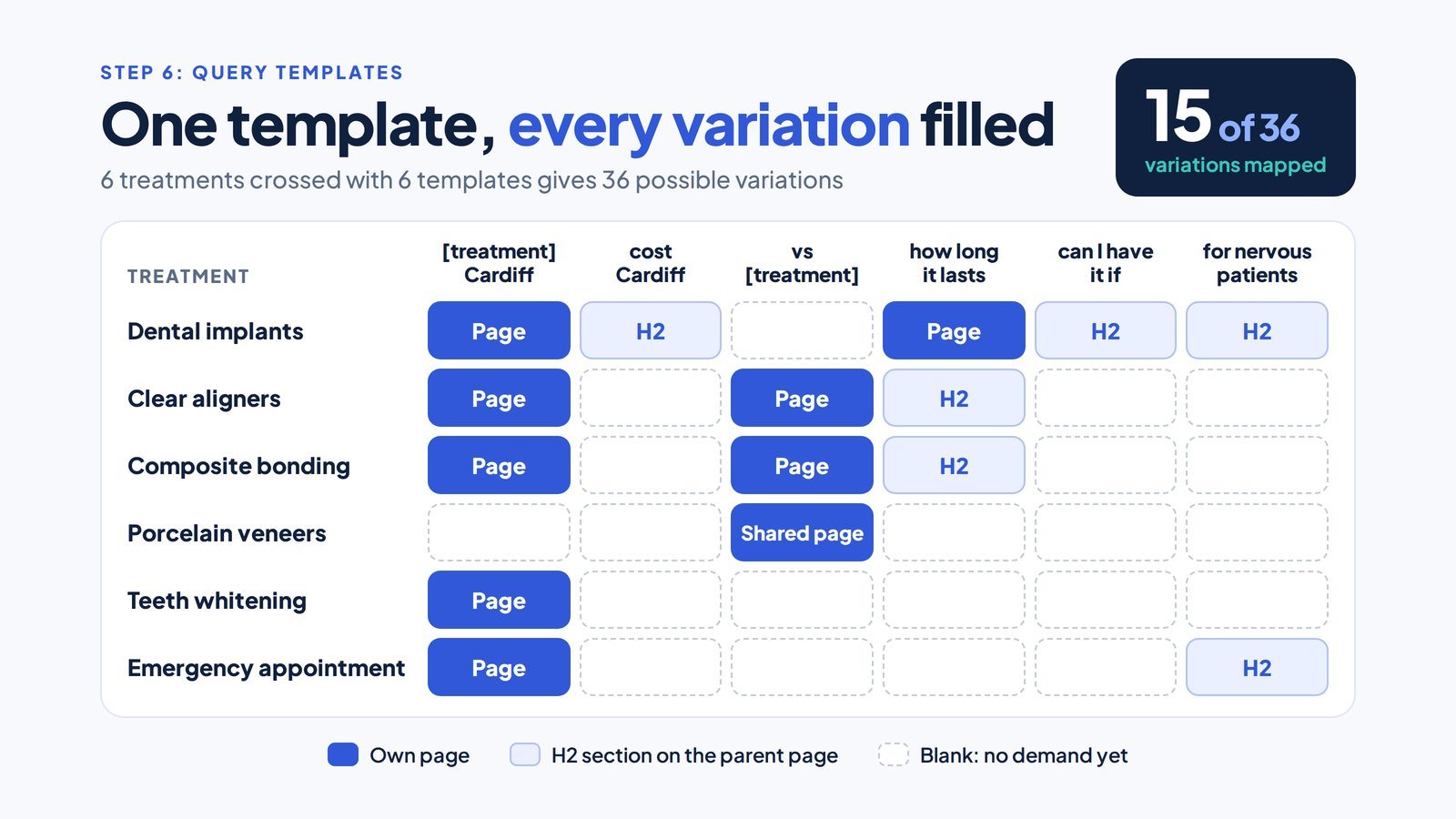
Step 6: Turn searches into query templates
Turn each search pattern your customers repeat into a template with a slot, then fill the slot with every entity from step 4. Collect the patterns from Search Console, Google Autocomplete, People Also Ask boxes and call notes; a question tool such as AnswerThePublic lists them in bulk. Koray’s Search Engine Land article on query templates puts the choice plainly: “There are two main methodologies for building topical authority: covering every entity and its attributes within a topic or covering every variation of a query template.” A good map uses both.
Google holds a patent, “Automatic query pattern generation”, describing patterns such as “[weather in X]”. A patent isn’t proof of use. Write templates as full questions where you can: in our own Search Console data, queries of 13 or more words average position 20.9, against 52.2 for one and two word queries. Our keyword research checklist for filling every template slot covers the volume checks that follow.
Worked example: Example Dental, Cardiff
Example Dental uses ten query templates, and filling them with its entities turns a short list of services into a full set of search variations.
- Template[treatment] Cardiff
- Filleddental implants Cardiff, clear aligners Cardiff, composite bonding Cardiff, teeth whitening Cardiff
- Template[treatment] vs [treatment]
- Filledclear aligners vs fixed braces, composite bonding vs veneers
- Templatewhat to do if [dental problem]
- Filledwhat to do if a tooth is knocked out
Map so far: 10 templates and 15 variations with demand, ready for the page decision.
Boss check: Is every slot either filled or marked “no demand yet”?
Step 7: Decide which queries deserve their own page
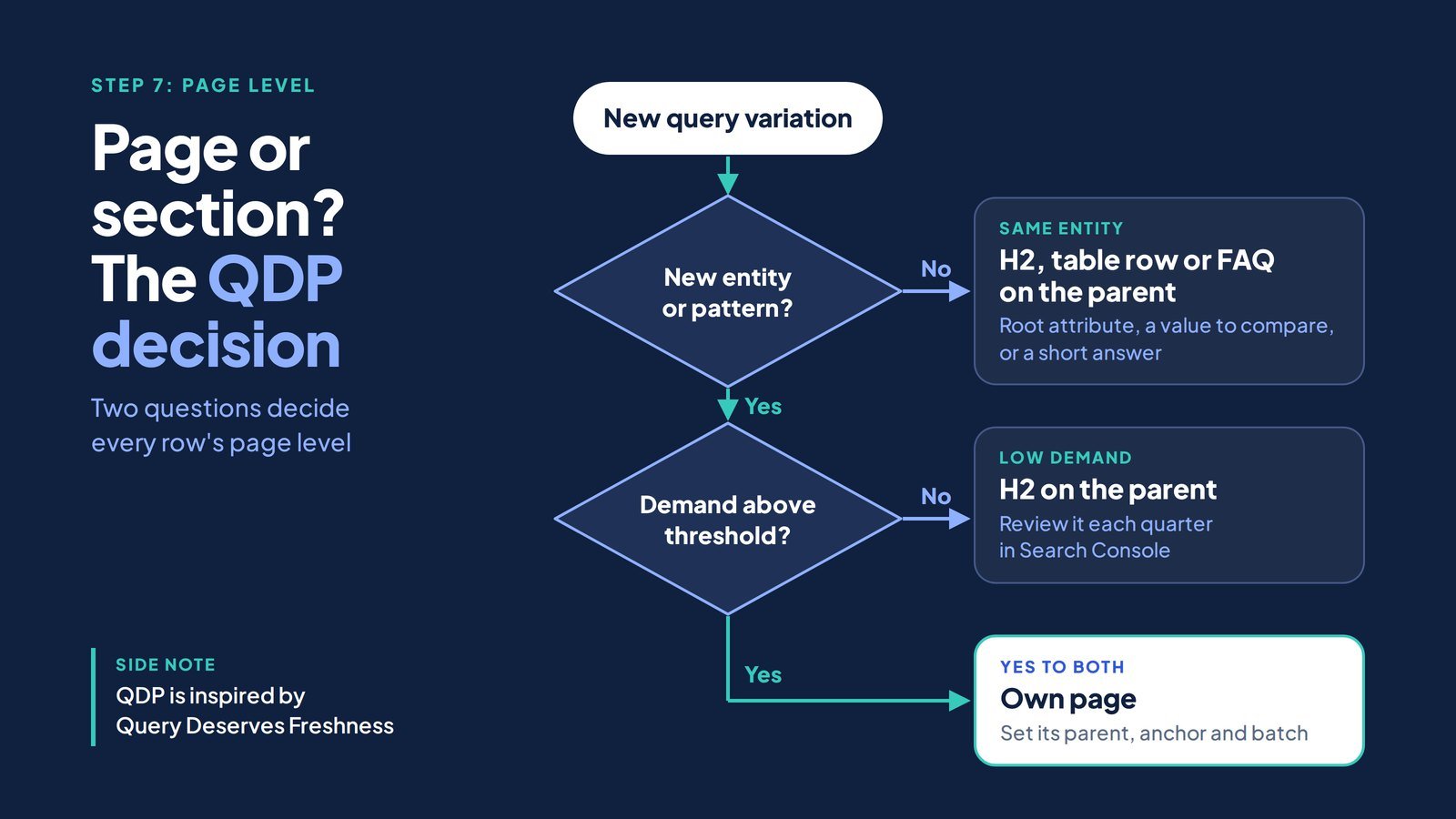
Give a query its own page only when it brings a different entity or pattern and its demand clears your threshold; otherwise it becomes an H2, a table row or an FAQ on the parent. Koray calls the metric Query Deserves a Page, writing in Search Engine Land that “Some queries deserve representation at the page level”, and credits Query Deserves Freshness, introduced by former Google engineer Amit Singhal, as its inspiration. Our working rule gives four outcomes:
- Own page: a new entity or entity pair, a new template, and visible demand.
- H2 on the parent: a root attribute of the same entity.
- Table row: a value that compares across members, such as price or lifespan.
- FAQ: a short answer with low demand.
Ahrefs and Semrush supply the volume and difficulty for each variation, but this rule does the grouping: keywords sharing one entity and one intent land on one node, never one article each. Google’s ranking systems guide says its site diversity system generally shows no more than two listings from one site in the top results.
Worked example: Example Dental, Cardiff
Example Dental runs every variation through the four outcomes, and the map settles at 26 nodes: 18 pages and 8 sections or rows.
- Own page“dental implants Cardiff”: a new entity with demand, so it gets the implants page (row 2)
- H2 on the parent“dental implant cost Cardiff”: cost is a root attribute of implants, so it sits on the implants page with a price table (row 3)
- Own page“clear aligners vs fixed braces”: a pair of entities and a new template (row 6)
- FAQ“can smokers get dental implants”: low demand and a short answer, so it is an FAQ row on the implants page (row 13)
Map so far: 26 nodes: 18 pages and 8 sections or rows.
Boss check: Could two pages on the map rank for the same query? The answer must be no.
Step 8: Split the nodes into core and outer sections
Put your commercial nodes in the core section and your informational nodes in the outer section. Koray’s query templates article defines both: “The core section is mostly commercial, and it carries the most important concepts and entities.” And: “The outer section is mostly informational, and it bridges the central entity to the other main entities of the topical map.”
We add one rule of our own: an outer page never targets a money query its core page owns, so your outer pages answer and hand the booking to the core.
Worked example: Example Dental, Cardiff
Example Dental’s 26 nodes split evenly: 13 core nodes that take bookings and 13 outer nodes that answer questions first.
- CoreRows 1 to 13: the homepage, the five treatment pages, the two comparison pages, the finance page and four sections on cost, suitability, sedation and smokers
- OuterRows 14 to 20 plus six more: implant lifespan, NHS implants in Wales, missing tooth options, knocked-out teeth, dentist registration, a wedding smile plan and implants abroad
- The rule in action“How long do dental implants last?” (row 14) never targets “dental implants Cardiff”. It answers the lifespan question and links to the implants page (row 2)
Map so far: 13 core nodes and 13 outer nodes.
Boss check: Does any outer page target a query that a core page should own?
Step 9: Add contextual bridges
Add bridge nodes that connect each neighbouring entity class to your core. A contextual bridge is the framework’s term for a connection that lets a map reach a nearby topic without drifting: it starts in a neighbouring class and always ends on a core page.
Build one bridge per neighbouring class at minimum, and check that each one carries the reader from their question to a service you sell.
Worked example: Example Dental, Cardiff
Example Dental builds six contextual bridges, one for each route patients take from a neighbouring topic to a treatment.
- Problem to treatment“Missing tooth: implant, bridge or denture” (row 16) compares the options and links to the implants page (row 2)
- Funding“Can you get dental implants on the NHS in Wales?” (row 15) answers honestly, then links to implants (row 2) and monthly finance (row 11)
- Life event“Wedding smile plan” (row 19) links to aligners, bonding and whitening (rows 5, 7 and 9)
Map so far: 6 contextual bridges connect every neighbouring class to the core.
Boss check: Does each bridge end on a core page, not on another outer page?
Step 10: Set internal links and anchor text for every row
Give every row in your sheet a parent, its link targets and the exact anchor text before anyone writes a page. Koray’s article sets the direction: “Internal links always flow from the outer section toward the core section to transfer ranking signals.” Core parents also link down to their own child pages. Google’s link guidance asks for descriptive, concise anchors.
Zyppy’s study of 23 million internal links across 1,800 websites found URLs with 0 to 4 internal links averaged 2 clicks from Google Search, while URLs with 40 to 44 received four times that, a correlation rather than a proven cause.
Worked example: Example Dental, Cardiff
Example Dental’s link sheet gives each row a direction and an anchor, so the writers never guess where a link goes.
- Outer to coreRow 14, implant lifespan, links to row 2 with the anchor “dental implant treatment in Cardiff”
- Outer to coreRow 17, knocked-out tooth, links to row 10 with the anchor “an emergency dental appointment”
- Core parent to childRow 5, clear aligners, links down to row 6 with the anchor “clear aligners compared with fixed braces”
- No link neededRow 3, implant cost, is an H2 on row 2, so it needs a jump link, not a new page link
Map so far: Every row has a parent, link targets and an anchor.
Boss check: Do links run from outer to core, with no anchor repeated more than three times?
Step 11: Order the pages into publishing batches
Publish your pages in batches by dependency, and never publish a child before its parent. Within a batch, publish the nodes with the highest margin and demand first. New domains should keep batches small and push the core live first.
Worked example: Example Dental, Cardiff
Example Dental releases its 26 nodes in four batches, so every page goes live after the parent it depends on.
- Batch 1Rows 1, 2, 3, 5, 7, 9 and 10: the homepage, the five treatment pages and the implant cost price table. Implants go first because they carry the highest fee
- Batch 2Rows 4, 6, 8, 11, 14, 15 and 16: the comparisons, finance, suitability, lifespan, NHS and missing tooth pages
- Batch 3Rows 12, 13, 17 and 18, plus two outer pages on bonding safety and chipped teeth
- Batch 4Rows 19 and 20, plus four outer H2s on aligner wear, bonding lifespan, whitening sensitivity and gum disease
Map so far: 4 batches. The map is ready to brief and publish.
Boss check: Is any child page scheduled before its parent?
What does a finished topical map look like? A worked example for a Cardiff dental practice
A finished topical map is a table of nodes, and Example Dental’s has 26: 18 pages and 8 sections or rows, 13 core and 13 outer, across four batches. The practice is invented and the map is illustrative.
| # | Node | Section | Query template or canonical query | Attribute | Page level | Links to | Batch |
|---|---|---|---|---|---|---|---|
| 1 | Private dentist in Cardiff (homepage) | Core | private dentist Cardiff | Root: location and service | Page | 2, 5, 7, 9, 10 | 1 |
| 2 | Dental implants in Cardiff | Core | [treatment] Cardiff | Root | Page | 3, 11, contact | 1 |
| 3 | Dental implant cost in Cardiff | Core | [treatment] cost Cardiff | Root: price | H2 on 2 with price table | Parent 2 | 1 |
| 4 | Implant suitability and bone grafts | Core | can I have [treatment] if [condition] | Unique | H2 on 2 | Parent 2 | 2 |
| 5 | Clear aligners in Cardiff | Core | [treatment] Cardiff | Root | Page | 6, 11 | 1 |
| 6 | Clear aligners vs fixed braces | Core | [treatment] vs [treatment] | Unique: entity pair | Page | 5 | 2 |
| 7 | Composite bonding in Cardiff | Core | [treatment] Cardiff | Root | Page | 8, 11 | 1 |
| 8 | Composite bonding vs veneers | Core | [treatment] vs [treatment] | Unique: entity pair | Page | 7 | 2 |
| 9 | Teeth whitening in Cardiff | Core | [treatment] Cardiff | Root | Page | 1 | 1 |
| 10 | Emergency dentist in Cardiff | Core | emergency dentist Cardiff | Root | Page | 2, 7 | 1 |
| 11 | Dental finance and paying monthly | Core | pay monthly dentist Cardiff | Root: payment | Page, plus H2 on 2, 5, 7 | 2, 5, 7 | 2 |
| 12 | Sedation for nervous patients | Core | [treatment] for nervous patients | Rare | H2 on 2 and 10 | Parent 2 | 3 |
| 13 | Implants for smokers | Core | can smokers get dental implants | Rare | FAQ row on 2 | Parent 2 | 3 |
| 14 | How long do dental implants last? | Outer | how long does [treatment] last | Root: lifespan | Page | 2 | 2 |
| 15 | Can you get dental implants on the NHS in Wales? | Outer bridge | can I get [treatment] on the NHS in Wales | Unique: funding | Page | 2, 11 | 2 |
| 16 | Missing tooth: implant, bridge or denture | Outer bridge | [dental problem] options | Root: problem | Page | 2 | 2 |
| 17 | What to do when a tooth is knocked out | Outer bridge | what to do if [dental problem] | Root: problem | Page | 10 | 3 |
| 18 | How to check a dentist is registered | Outer trust | how to check a dentist is registered | Root: trust | Page | 1 | 3 |
| 19 | Wedding smile plan | Outer bridge | smile makeover before wedding | Rare: life event | Page | 5, 7, 9 | 4 |
| 20 | Dental implants abroad vs in the UK | Outer bridge | [treatment] abroad vs UK | Unique | Page | 2, 3, 11 | 4 |
The other six nodes are outer: two batch 3 pages (“Is composite bonding bad for your teeth?” and chipped tooth repair options) and four batch 4 H2s on aligner wear hours, bonding lifespan, whitening sensitivity and gum disease.
Six contextual bridges tie the outer section to the core: funding, problem to treatment, emergency, life event, trust and cost, each drawn as a dashed line on the map above. Our local SEO for dental practices builds this map around the treatments and locations you sell, so each treatment search lands on the page that books it.
Why is each node a page, a section or a row?
Each node’s level comes from the step 7 rule. Row 3, implant cost, is an H2 because cost is a root attribute and the searcher wants the implants page anyway. Row 6, aligners versus braces, is a page because it adds a second entity and a new template. Row 13, implants for smokers, is an FAQ row: low demand, short answer. Row 12, sedation, stays an H2 until Search Console shows that query group growing.
How do you turn the map into content briefs?
Turn each page row of your map into a brief with five fields: the H1, answer-first H2s drawn from its templates, the entities it must name, its parent, and the anchor that links to it. Layout belongs in the brief too: Koray’s Search Engine Land article on visual semantics reports clicks up 30.5% and impressions up 98.6% on a converter site of more than 100,000 pages after its calculator moved from the bottom of the page to the top, so a cost row should specify its price table.
Topical Map for SEO
Get a map like Example Dental’s for your business
A fixed-price £500 ex VAT map with keyword clusters, content hierarchy, internal linking, competitive gaps, topic suggestions and a phased publishing plan.
How do you get a competitor’s topical map?
You get a competitor’s topical map by reading their sitemap, grouping the URLs into entity classes, and reading query templates from their titles. The free route needs a browser and a crawler:
- Open /sitemap.xml or /sitemap_index.xml and export every URL.
- Group URLs by folder, since folders such as /treatments/ reveal entity classes.
- Crawl them with Screaming Frog SEO Spider and export titles and H1s.
- Tag each URL core or outer: does it sell, or explain?
- Build a gap matrix of entity against attribute.
Paid tools go faster: Surfer’s Topical Map tool compares competitor coverage, and Ahrefs or Semrush show which pages earn traffic. None of them can judge which gaps fit your source context. Our guide to finding the keywords and pages your search competitors win covers the gap analysis that sits beside this.
| Entity and attribute | Your site | Competitor A | Competitor B | Action |
|---|---|---|---|---|
| Implants: cost | Missing | Page | H2 | Add H2 with price table |
| Implants: lifespan | Missing | Missing | Page | Publish outer page |
| Aligners vs braces | H2 | Page | Missing | Upgrade to own page |
| Bonding vs veneers | Missing | Page | Page | Publish in batch 2 |
| Knocked-out tooth | Missing | Missing | Missing | Publish in batch 3 |
How do you map an existing website onto a topical map?
You map your existing site by crawling it, assigning every URL to one row, and acting on the leftovers: merge duplicates, redirect the losers, rewrite pages sitting on the wrong level, and list the missing nodes. Two of your URLs on one row mean keyword cannibalisation; confirm it by filtering the query in Search Console and watching Google swap pages.
Your own Search Console export validates the map fastest: group queries by template and entity, then see which page Google picks. Ours showed the gap at once: “get topical map of competitor seo” had 1,675 impressions at position 50.4, the best in the cluster, and “how to complete a topical map seo” had 596 at 78.7. Every one landed on our product page, and we had no informational page to offer.
Our SEO audit service maps every live URL to the node it should serve, so you know what to merge and rewrite before briefing new pages.
How do you know a topical map is complete?
You know a topical map is complete when it passes six checks you can run in your spreadsheet:
- Every member of the entity class has a row.
- Every root attribute is covered for every member, as a page, H2, row or FAQ.
- Every template variation has a level or has been dropped on purpose.
- Every node has a parent and at least one link in.
- No two rows target the same variation of the same entity.
- Every neighbouring entity class has a bridge to the core.
Page count follows from those checks, not a target: Example Dental’s six treatments across six of its templates give 36 possible variations, and QDP plus the bridges settle the map at 26 nodes. Our 12-step guide to how many articles topical authority takes covers article volume from the authority side.
Completeness is a floor. Koray’s query templates article says covering more attributes or variations than competitors “doesn’t guarantee better rankings”. His Holistic SEO study names three ways to grow a map: more entities of the same type, more attributes of existing ones, and deeper context.
Can AI or a topical map generator build the map for you?
AI generators list entity members and template variations quickly, but they can’t write your source context, apply QDP or judge which node earns money. Use one for steps 4 and 6, and make every other decision yourself.
The risk is publishing straight from the output. Google’s spam policies define scaled content abuse as “when many pages are generated for the primary purpose of manipulating search rankings and not helping users”, and list using generative AI to create many pages without adding value as an example. We’d rather hand a writer 26 rows they can build properly than 300 they can’t.
ChatGPT prompts follow the same split. Give it your source context sentence, entity class and templates, not “a topical map for dentists”, and ask for a table of variations to judge at step 7. It can’t see your Search Console data, so check any search volume it prints.
What are the most common topical map mistakes?
The most common topical map mistakes are starting without a source context and letting the wrong page on your site answer a query. The others we meet in audits:
- A service or product page answering how-to queries, which is our own Search Console lesson.
- One page per keyword instead of one per entity and pattern.
- Outer pages linking nowhere, so relevance never reaches the core.
- Children published before parents.
An illustrative two-office law firm, with invented figures, shows the cost of one page per keyword. Eleven of its 64 posts targeted “how much does probate cost”, and Google rotated four of them, none above position 30. The firm merged all 11 into a fee-table H2 on its probate page. Four months later that page sat at position 6, and its enquiries rose from 2 to 9 a month.
How do you measure whether a topical map is working?
Measure your topical map section by section in Search Console: queries, impressions, average position, clicks and indexed pages for your core and outer sections separately. Check AI answers by hand for your top ten questions. Kevin Indig’s Growth Memo proposes “Topic Share”, the share of traffic your site captures across a topic’s keywords, which suits a map defined row by row.
Results take weeks to months, and nobody can promise you a date. Graphite’s study of 332 URLs across 12 domains found that pages with higher topical authority scores were more likely to gain visibility within their first three weeks. Our client RX Virtual Finance reached the first page for “pharmacy accountants” within about 60 days and later number one: one case, not a forecast.
An illustrative garden furniture store on Shopwired, also with invented figures, shows the method at work. Its rattan sofa category sat at 120 weekly impressions until the map added material, seat count and cover as attribute nodes plus three outer guides. Twelve weeks later that section showed 1,450 weekly impressions at an average position of 14, up from 38.
How does a topical map change for a local business or an ecommerce store?
A local business map is built on service and location pairs, while an ecommerce map is built on category and attribute pairs. Koray’s Search Engine Land article on local SEO argues that fewer, more purposeful pages can improve relevance and reduce duplication, with the most important location and service pair on the most important page. That’s why Example Dental’s homepage targets “private dentist Cardiff”. You can see an ecommerce map at work in our case study of a UK bathroom store on Shopify, where collections, products and planning guides each own one attribute.
Your entity class changes by sector; the method doesn’t:
- Accountants: services such as VAT returns and payroll, with “[service] for [client type] in [city]” templates.
- Solicitors: practice areas such as probate and conveyancing, with fee and timescale attributes.
- Hotels: room types and occasions, bridged to bookings.
- Letting agents: landlord services and area guides, bridged to valuations.
- Shopify, Shopwired and WooCommerce stores: categories crossed with attributes such as material and size, which often become filters rather than pages.
A multi-location business repeats a core page per location only where demand differs by place.
What should a topical map template include?
Your topical map template needs 13 columns, and you can build it in Google Sheets or Excel.
| Column | What it records |
|---|---|
| Node | The page or section name |
| Section | Core or outer |
| Entity | The entity the node covers |
| Query template | The pattern with its slot |
| Canonical query | The variation the node targets |
| Attribute type | Root, unique or rare |
| Page level | Page, H2, table row or FAQ |
| Parent | The node above it |
| Links to | The nodes it links to |
| Anchor text | The exact anchor pointing to it |
| Batch | Publishing batch number |
| Status | Briefed, written or live |
| Search Console baseline | Impressions and position on launch day |
Search Console supplies demand, Screaming Frog crawls sites, and a mind-map tool such as Miro draws the result. Draw it as hub and spoke rings: central entity in the middle, core nodes inside, outer pages, FAQs and how-to guides outside, arrows pointing inward. Keep the spreadsheet as the master, since a diagram can’t hold anchors or batches.
Should you build a topical map yourself or pay for one?
Build the map yourself when you know your services and have time for the 11 steps. Pay for one when your entity class is large, your site already has cannibalisation, or nobody on your team can defend a page or section decision. A good paid map shows its working: a written source context, a level and anchor on every row, batches and competitor gap evidence.
Our Topical Map for SEO delivers that plan at a fixed price of £500 ex VAT: keyword clusters, a content hierarchy roadmap, internal linking, competitive gap analysis, topic suggestions and a phased publishing plan, so your writers start with decisions made.
Self-check quiz
Which part of the topical map does this query belong in?
Eight queries from the Example Dental map; pick the best home for each.
Question 1 of 8“dental implants Cardiff” belongs in:
Question 2 of 8“dental implant cost Cardiff” should be:
Question 3 of 8“Invisalign vs braces” should be:
Question 4 of 8“can I get implants on the NHS in Wales” is:
Question 5 of 8“can smokers get dental implants” with low demand should be:
Question 6 of 8Internal links in a topical map should mainly flow:
Question 7 of 8Which page should go live first?
Question 8 of 8Your product page ranks for “how to create a topical map”. The fix is:
Show the answer key
- “dental implants Cardiff” belongs in: Core section, its own page. It is the root commercial query for a core entity.
- “dental implant cost Cardiff” should be: An H2 with a price table on the implants page. Cost is a root attribute of the same entity.
- “Invisalign vs braces” should be: Its own page. It adds a second entity and a new template.
- “can I get implants on the NHS in Wales” is: An outer bridge page. It connects a funding entity to the commercial core.
- “can smokers get dental implants” with low demand should be: An FAQ row on the implants page. A rare attribute with a short answer and little demand.
- Internal links in a topical map should mainly flow: Outer to core. Outer pages pass relevance to the commercial core.
- Which page should go live first? Emergency dentist in Cardiff. A parent page must exist before its children, and batch 1 holds the core hubs.
- Your product page ranks for “how to create a topical map”. The fix is: Publish a blog that answers it and links to the product page. The query deserves an informational page; this is our own Search Console lesson.
Frequently asked questions
Who created the topical map method?
Koray Tugberk Gubur, founder of Holistic SEO, developed the topical map framework used here and published it through Holistic SEO, OnCrawl and Search Engine Land. His OnCrawl case study gives the original formula as “Topical Authority = Topical Coverage * Historical Data”. Our founder, Mohammad A Mahmud, trained in the method.
How long does a topical map take to build?
A short local map takes us days by hand and a large ecommerce map takes weeks, because the page level and link decisions are slow.
How often should you update a topical map?
Update a topical map when you add a service, a new template appears in Search Console, or a core update moves rankings. Review your sections quarterly.
Do backlinks still matter if you have a topical map?
Backlinks still matter, because a map organises relevance and links add authority. Koray has written that an aligned source context helps outside authority turn into rankings.
Is a topical map the same as a topic cluster?
A topical map is not the same as a topic cluster: a cluster is one pillar with its supporting pages, while a map covers every cluster with levels, link direction and order.
Does a topical map need a new URL structure?
A topical map doesn’t need a new URL structure: keep the URLs that already rank and show hierarchy through parents and internal links.
How does a topical map fit into the rest of semantic SEO?
A topical map is the first deliverable in semantic SEO: the map becomes briefs, briefs become answer-first pages, and pages link outer to core until the network earns authority. We bill that work on KPIs, not hours.
True SEO Consultants Ltd works from Startup Stiwdio, University of South Wales, 86-88 Adam Street, Cardiff, CF24 2FN, led by Mohammad A Mahmud, ACCA qualified, and Julie Williams, a fractional finance director with more than 30 years’ experience. Mohammad wrote Research Report TSC-2026-01, our audit of 494 UK accountancy practice websites, whose most common measured fault was no page for a high-fee service, a missing core node. We’ve worked with more than 200 UK clients across about 18 sectors. We serve businesses across the UK through remote digital onboarding and delivery. Start with your source context sentence today.
Find out whether you need a map or a fix
We look at your Search Console queries with you and tell you which pages your site is missing.
Book my free strategy callSee how the programme runsCredit and acknowledgement
Credit: Koray Tuğberk Gübür
The method in this guide comes from Koray Tuğberk Gübür, founder of Holistic SEO & Digital, who developed the topical map and topical authority framework and gave it the names we use throughout: source context, central entity, central search intent, core and outer sections, contextual bridges and Query Deserves a Page.
We decoded the step-by-step process from his YouTube videos, then checked each step against his published articles on Holistic SEO, OnCrawl and Search Engine Land. Our founder, Mohammad A Mahmud, trained in his semantic SEO method, and the Example Dental walkthrough is our own worked application of it.
This guide is True SEO’s interpretation of his framework. He hasn’t reviewed or endorsed it, and any mistakes in it are ours.