Getting your business on Google takes three jobs in order: create and verify a free Google Business Profile, make sure your website is indexed through Google Search Console, then give Google consistent facts, honest reviews and one clear page per service so it can choose you.
Those three jobs make you listed, indexed and chosen. The same work is what AI answers in Google, ChatGPT, Gemini and Copilot draw on, so the fourth stage, getting named, is mostly a matter of checking what they say. Each stage depends on the one before it. This guide takes them in order, with the Google help page behind each step, because the rules change and you should be able to check them yourself.
Disclosure: True SEO Consultants Ltd sells local and AI search services and publishes the book quoted on this page. Every step below can be done without either, using a browser and a free Google account.
Four stages, then the default
- ListedCreate and verify your Google Business Profile.An afternoon
- IndexedCheck your website is in Google, through Search Console.About two hours
- ChosenMatching facts, honest reviews, one page per service.An hour, then an afternoon
- NamedCheck what AI assistants say about you.One hour a quarter
- DefaultFinish one section of pages and keep it up.Two to four months of work
Effort estimates come from Become the Default, chapters 21, 24, 46 and 55. They describe your time, not when results arrive.
Get listed: create and verify your Google Business Profile
A Google Business Profile is the free listing that puts your business on Google Maps and in the local results on Google Search, and Google states that only verified businesses can show their business information on Maps and Search.
Everything else about you on Google is written by somebody else: customers, directories, Google itself. The profile is the one entry you control. Become the Default, chapter 21, puts it like this: “Everything else in the file is written about you. This one you write yourself.”
How do I show my business on Google?
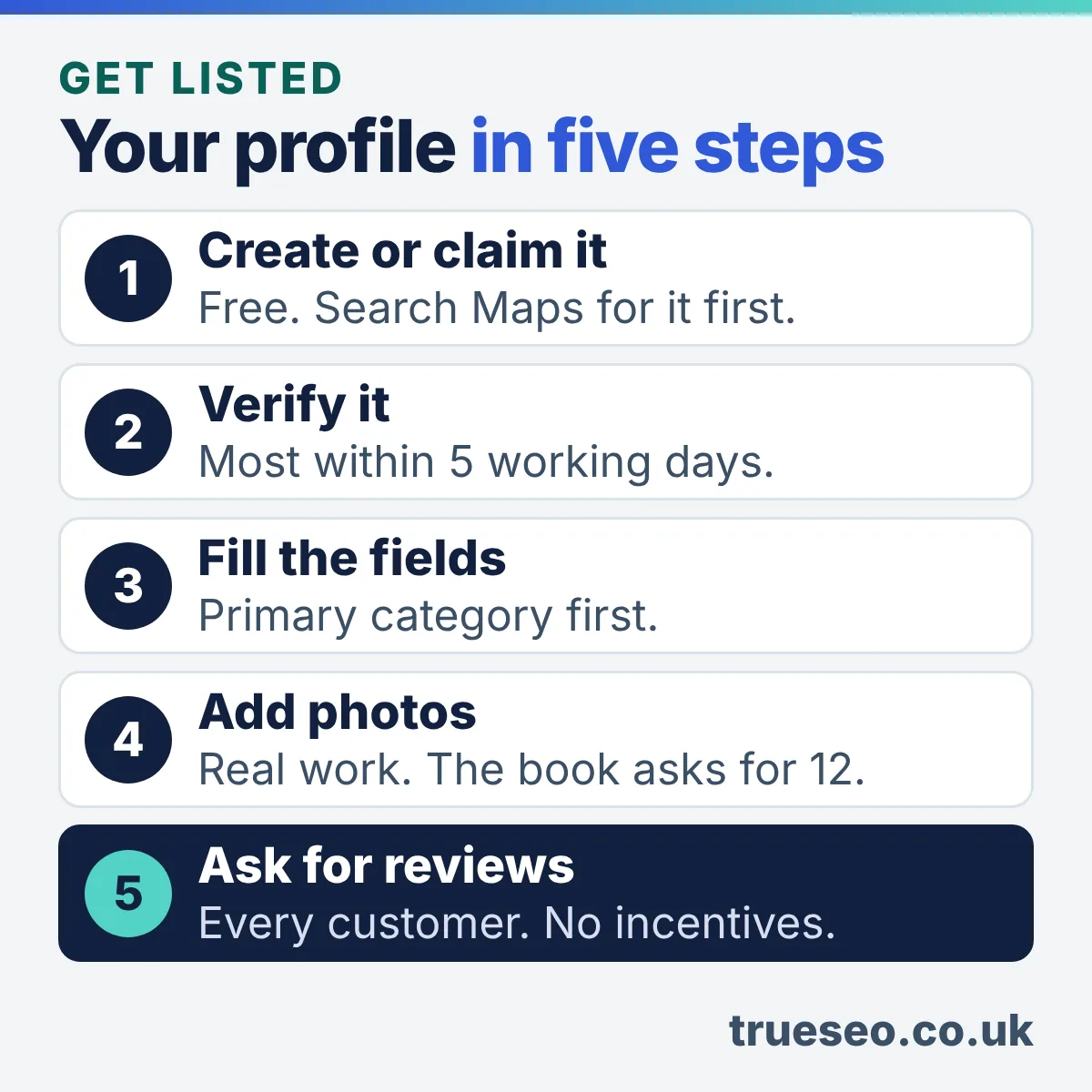
Your business shows on Google once you add or claim a Business Profile, enter your details and pass Google’s verification; Google states that you can add or claim your business at no charge.
- Search first. Look up your business name and town on Google Maps. A profile may already exist. Select “Claim this business”, then “Manage now”.
- Create it. No profile yet? Go to business.google.com/add and select “Add your business to Google”.
- Enter the details. Name, category, address or service area, phone number and website. Google asks you to check the address is correct and meets its guidelines.
- Verify. Select a verification option and follow the on-screen steps.
- Wait for the email. Google sends a confirmation email when your business is verified.
A clinic, a practice or a branch office each add a wrinkle of their own. The clinic version, with the category and practitioner questions, is set out in Google Business Profile for chiropractors.
How does Google verify a business?
Google verifies a business by phone or text, email, video recording, live video call or postcard, and Google chooses which of these you are offered; its help page says verification methods are automatically determined and can’t be changed.
Google may ask some businesses for more than one method. Where video recording is offered, Google recommends it.
For a live video call, Google asks you to show your location and ownership:
- Outside signs or a street sign
- The tools or equipment you use
- An employee only area or non-sensitive business documents
Two things to know. Calls are only available within your opening hours. Some profiles are verified instantly, for example when the website is already verified in Google Search Console.
Source: Google Business Profile Help, “Verify your business on Google” and “Find your business on Google”. Google adds that some reviews take longer.
Which Business Profile fields matter most?
The fields that matter most are the business name, primary category, address or service area, phone number, website, hours, photos and description, because Google says businesses with complete and accurate information are more likely to show up in local search results.
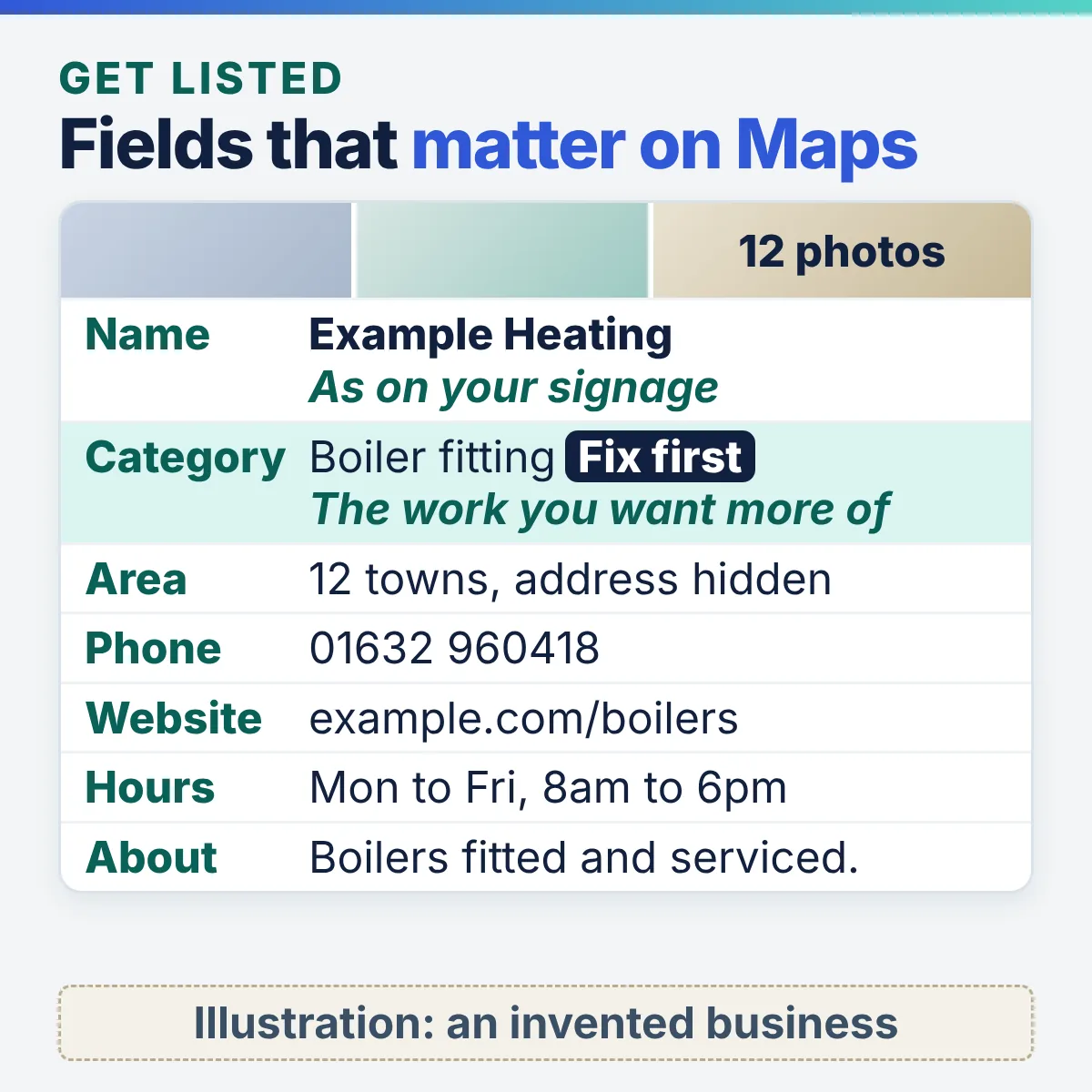
The field Become the Default, chapter 21, calls the one most worth fixing today. Pick the category for the work you want more of.
“Choose categories that are as specific as possible, but representative of your main business.”
Your name as it appears on your signage and paperwork. Nothing added.
“Including unnecessary information in your business name isn’t permitted.”
The address customers visit, or a hidden address with the areas you serve.
“You can set up to 20 service areas.”
A number that reaches this location, owned by the business.
“The phone number must be under the direct control of the business.”
The page for this location, not a generic one.
“Provide a website that represents your individual business location.”
Regular hours, plus special hours for bank holidays and closures.
“Provide your regular customer-facing hours of operation.”
Real work, real premises, real people. Become the Default, chapter 21, asks for twelve.
Google lists adding photos and videos among its tips to improve local ranking.
What you do and for whom, in plain words. Save offers for posts.
“No links of any type are allowed.”
At least two people with access, so the profile does not depend on one inbox.
Google lets you add additional owners and managers to help manage a profile.
Quotes from Google Business Profile Help: “Guidelines for representing your business on Google”, “Manage your service areas for service-area and hybrid businesses”, “Get started with Google Business Profile” and “Tips to improve your local ranking on Google”.
The book’s composite heating engineer, Graham, shows why the category comes first: his profile said plumber, while boiler installation earns him four times as much as plumbing. A different trade, the same fault, appears in the guide to Google Business Profile for an accountancy practice.
What if you work at your customers’ premises?
A service area business, such as a plumber or mobile mechanic, should hide its address and list the areas it serves; Google allows up to 20 service areas and says the overall area shouldn’t extend beyond about two hours of driving from your base.
Set areas by town, postcode or region, not as a radius around your base. Google adds that a larger area may suit some businesses. Become the Default, chapter 23, covers the towns next door honestly, in three parts:
“You cannot pretend to be somewhere. You can be genuinely useful to somebody who is.”
Become the Default, chapter 23
Which businesses can have a Business Profile?
A business can have a Business Profile when customers can visit its physical location or it travels to customers; a rented postal address you don’t operate from is not eligible, and Google says there should only be one profile per business.
- PO boxes and mailboxes at remote locations aren’t acceptable.
- A virtual office is only allowed when it is staffed during opening hours.
- Separate locations, each with their own staff and service area, can have one profile each. The branch question has its own page: one Google Business Profile per branch, or one per agency.
- A practitioner shouldn’t have several profiles to cover each specialisation.
Pick your starting point
- Claim or create the profile with your real, staffed address showing.
- Set the primary category for your most profitable work.
- Add opening hours and special hours.
- Then move to step two, your website.
- Create the profile, then remove the address customers would see.
- Add up to 20 service areas by town or postcode.
- Use a phone number the business controls, not a personal mobile you might change.
- Then move to step two, your website.
- Google’s eligibility wording covers businesses customers visit, or that travel to customers. An online only shop starts at step two.
- Put your effort into indexed pages: one for each product range or question customers ask.
- Keep your business facts identical on every marketplace and directory.
Should I have a separate Google Account for my business?
A separate Google Account is not required by Google, which lets you manage a Business Profile from a new or existing account with any email address, but Google advises linking a company email address, and an account the business owns is the safer choice.
Google sends suspension notices to the Google Account used to manage the profile, so that inbox has to be one somebody reads. Staff leave, and a profile held in a former employee’s personal Gmail leaves the business asking for access to its own listing.
Set it up this way:
- Use an address on your own domain as the account that manages the profile.
- Add a second owner. Google lets you add additional owners and managers, so a second owner costs nothing.
- Write down who holds the login on the facts sheet described under “Get chosen” below.
Get indexed: how to get your website on Google Search
Your website gets on Google Search when Google reads and indexes its pages, which usually happens without you submitting anything, because Google says it primarily finds pages through links from other pages it has already read.
The profile puts you on the map. Your website is what Google reads to decide what you actually do, so it has to be in Google’s index before it can be chosen for anything. Google’s SEO Starter Guide says you usually don’t need to do anything except publish your site. The word to check is “usually”. Three steps tell you whether it has happened.
Is my website already on Google?
Your website is already on Google when a search for site: followed by your domain, for example site:yourbusiness.co.uk, returns results from it; Google’s own SEO Starter Guide gives this as the check.
site:yourbusiness.co.uk- Count the results
- Check what comes back against the pages you know you have.
- A service page missing
- That is the one that matters.
- No results at all
- Usually a very new site, or a setting that blocks Google, which is a question for your developer.
How do I set up Google Search Console?
Google Search Console is Google’s free service for website owners: you add your website, prove you own it, and it then shows which pages Google has indexed and which searches your pages appear for.
- Sign in with the same business Google Account that manages your profile.
- Add your website as a property and verify ownership with one of the methods offered. Your web host or developer can add the file, tag or DNS record the chosen method needs.
- Open the Performance report a few days later. Google says traffic from its AI features is counted there too, within the “Web” search type.
Rung one of the book’s ladder. Become the Default makes this rung one of its ten rung ladder: claim Search Console, find which page is meant to answer your most profitable service, and look at what you already appear for. The book allows two hours for it.
How do I ask Google to index a page?
You ask Google to index a page with the URL Inspection tool in Search Console: paste the page address, check the result, then request indexing; for large numbers of pages, Google recommends submitting a sitemap instead.
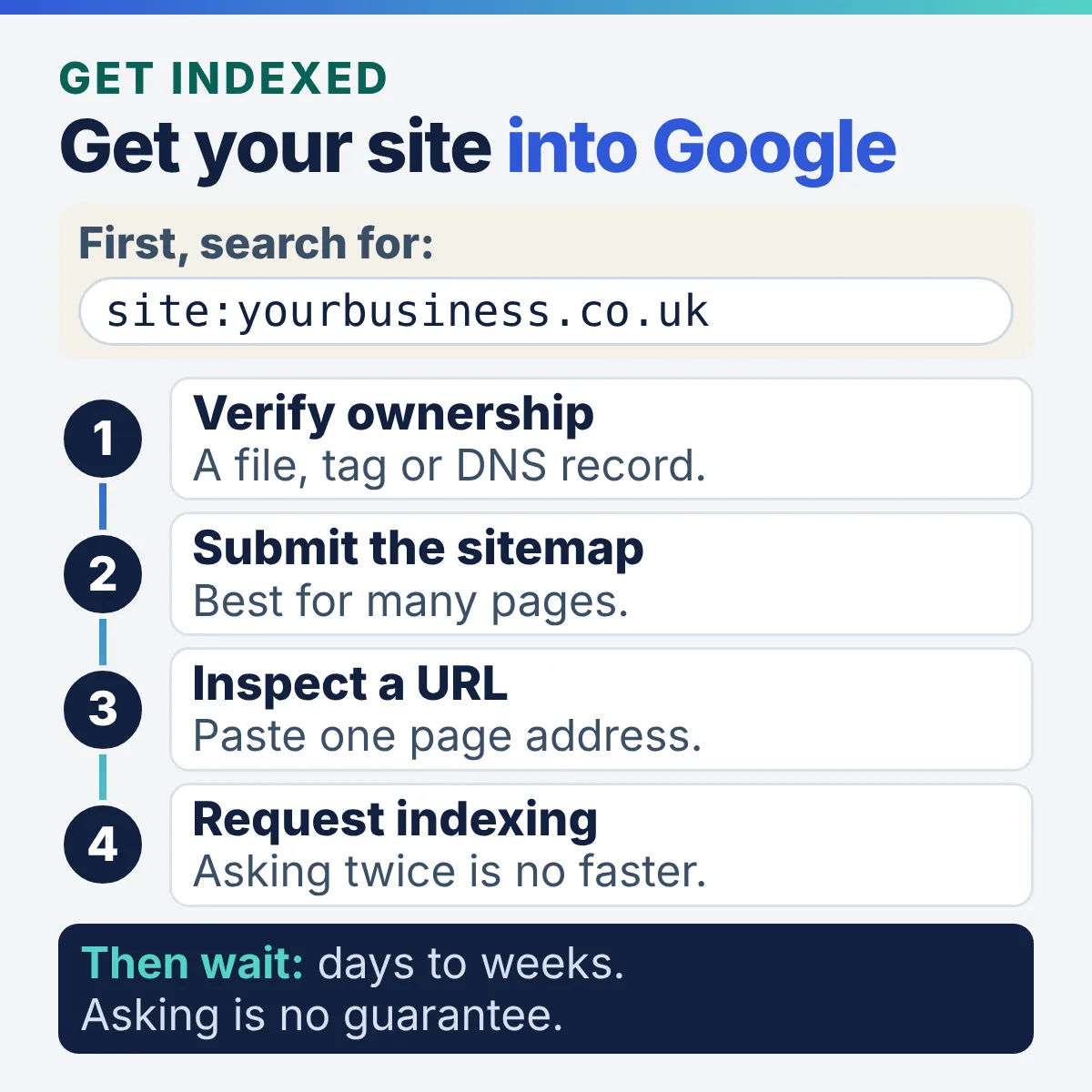
- A sitemap is a file listing the pages on your site you care about. Google notes some content management systems create one automatically.
- A revisit can take anywhere from a few days to a few weeks, according to Google.
- There is a quota for individual requests, and Google says requesting the same page several times won’t get it read any faster.
- Google states that asking it to revisit a page does not guarantee the page will be included in results.
Get chosen: how Google picks one business over another
Google picks businesses for its map results using three factors it names, relevance, distance and prominence (its summary sentence says popularity), and you can work on two of them; distance depends on where the searcher is standing.
Being listed and indexed makes you a candidate. Being chosen is a comparison, and it is decided by evidence Google can check. The main results run on ranking systems that Google changes through updates. Become the Default, chapter 3, reads twenty years of Google algorithm updates as one pattern: almost every major update priced out a shortcut, and none was built to stop good work.
How do you get your business to appear first on Google?
Your business appears first on Google when its profile and pages are the most relevant and prominent match for that search near that searcher, and Google states there’s no way to request or pay for a better local ranking.
Ads are the only paid position, and they are a separate product. Ads stop the day the card stops. A page you own keeps working.
The free positions respond to four things you control:
- A complete, accurate profile. Google says complete and accurate information makes you more likely to show up.
- Reviews. Google says more reviews and positive ratings can help your local ranking.
- Facts that agree everywhere. The same name, address, phone and description on every listing.
- One page per service. A page that answers the exact question the customer typed.
True SEO Consultants Ltd offers local and multi-location SEO services across the UK through remote digital onboarding and delivery, for owners who would rather have this done with them.
How should I ask customers for reviews?
Ask every customer for a review, the same way, at the point the job is done; Google’s policy prohibits offering incentives for reviews, selectively soliciting positive reviews, and pressuring customers to leave reviews while on your premises.
What Google’s review policy rules out:
- Offering incentives for reviews
- Selectively soliciting positive reviews
- Pressuring customers to leave reviews while on your premises
- Reviews with a conflict of interest, which includes current or former employees
UK law also applies. The Competition and Markets Authority’s fake reviews guidance (CMA208, April 2025) treats fake reviews and concealed incentivised reviews as banned practices under the Digital Markets, Competition and Consumers Act 2024.
Become the Default, chapter 22, turns this into a habit in three parts:
“The only part of your reputation you cannot write yourself is the only part a stranger fully believes.”
Become the Default, chapter 22
Why do my business details need to match everywhere?
Your business details need to match everywhere because a business described three ways gives Google and AI assistants three possible facts, and Become the Default, chapter 45, argues that a source which contradicts itself gets skipped.
The fix in chapter 24 is one page: the facts sheet.
- Decide every fact once
- Write it down
- Copy it into each place you appear
- When something changes, change the sheet first, then push the change everywhere
- Identity
- Registered name, trading name, the name on your signage
- Contact
- Address or service area, one phone number, one email, website
- Description
- One sentence and one paragraph, used word for word everywhere
- People
- Who runs it, named, and who holds the Google login
- Proof
- Accreditations, memberships and dates you can show
- Pushed to
- A tick list of every profile, directory and listing updated
“Decide the facts once. After that it is copying, and copying is not a skill.”
Become the Default, chapter 24
Does every service need its own page?
Every service you want to be found for needs its own page, because a specific question gets a specific answer; Become the Default, chapter 45, notes that a business described in the language of nine services is a candidate for nothing in particular.
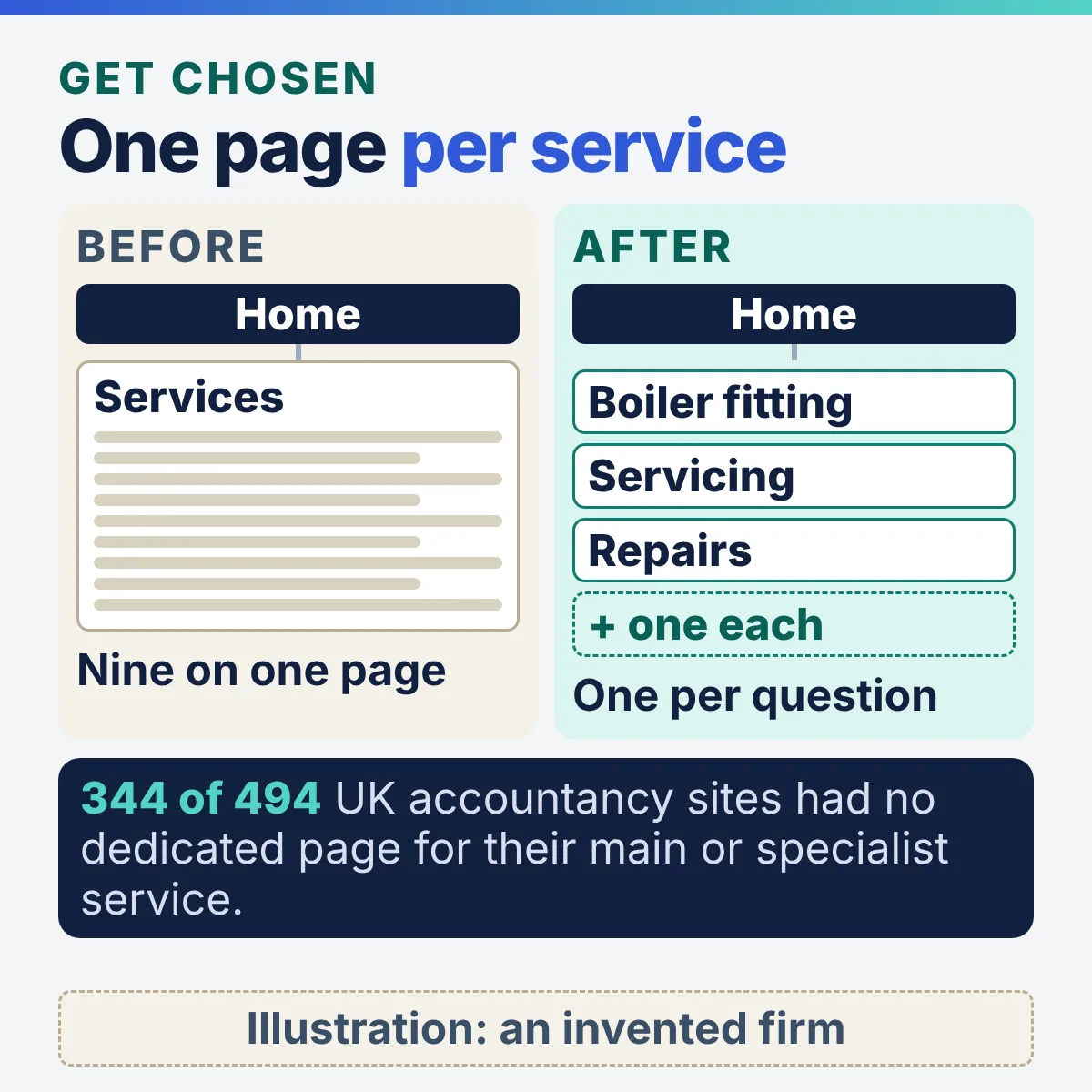
Chapter 1 of the book reports that 344 of the 494 UK accountancy practice websites in research report TSC-2026-01, 69.6 per cent, had no dedicated page for the service the practice itself presents as its main or specialist work. The report is published openly, and True SEO sells services to accountancy practices, so read it with that interest in mind. One page per service, written to answer the question a customer actually types, is what gives Google a page to choose for that service.
The book behind this guide
Become the Default
SEO, AEO and GEO for Ambitious Business Owners
The steps on this page draw on chapters 21 to 24, 44 to 46 and 55, in short form. AEO and GEO are the trade names for getting your business named in answers written by AI. The book adds the parts a web page cannot hold:
- The full facts sheet and 22 other handbook sheets
- The review habit, from the ask to the reply
- The ten prompts and the scoring sheet
- A ten rung ladder with an honest time cost on each rung
Get named: AI Overviews, AI Mode, ChatGPT, Gemini and Copilot
AI answers name businesses from material that already exists: Google’s AI Overviews and AI Mode draw on pages in Google’s index, and Google states there are no additional requirements to appear in them, nor other special optimisations necessary.
That makes stages one to three the AI work. To be shown as a supporting link, Google says a page must be indexed and eligible to appear in Search with a snippet. What changes is the question you ask of the result. Become the Default, chapter 44: “The question changed from whether you can be found to whether you get named. Almost nothing about the work changed.”
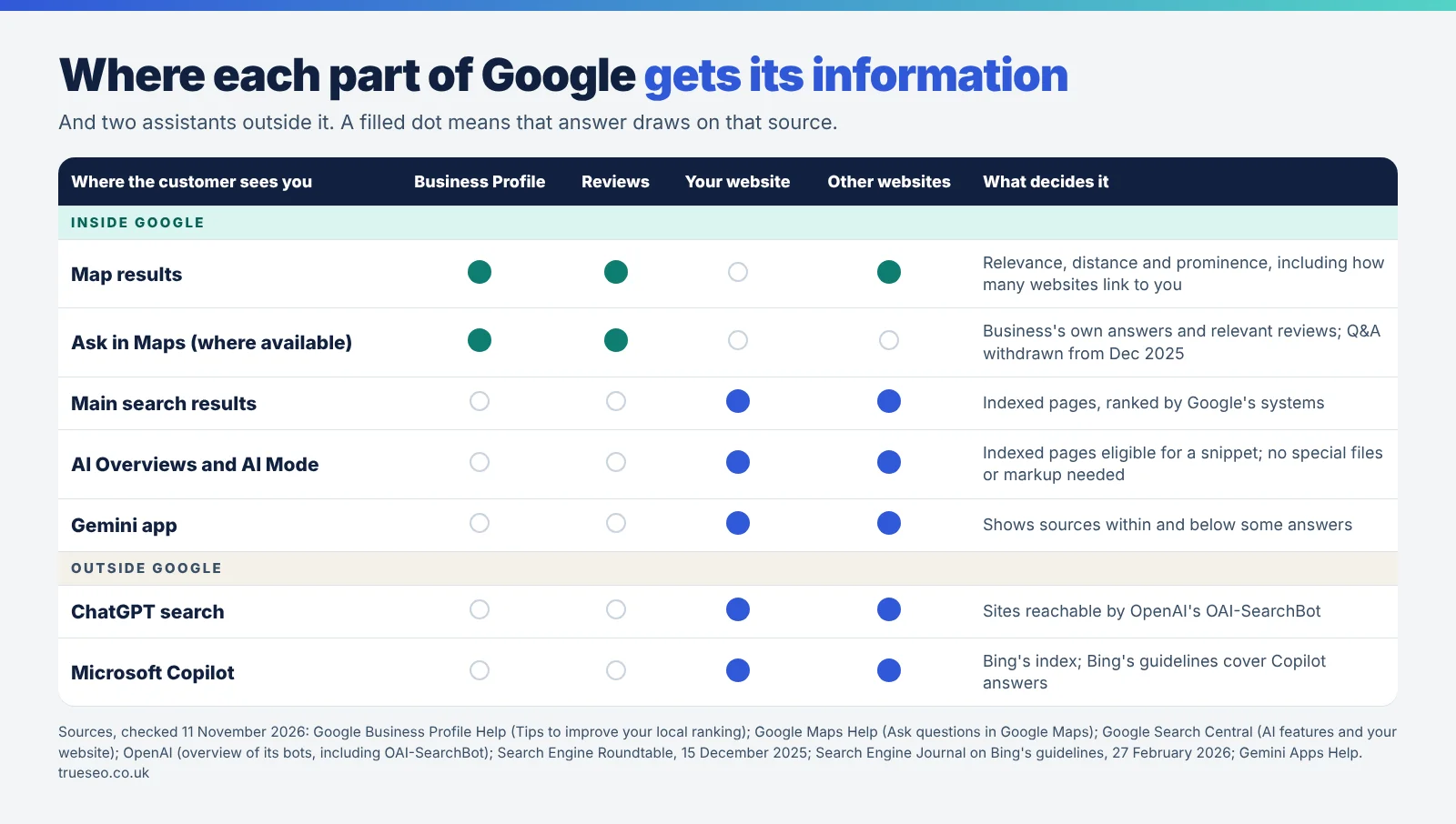
Your Business Profile, reviews and ratings, how many websites link to you, and distance from the searcher. Ranked on relevance, distance and prominence.
Public questions and answers are being withdrawn from Maps, a Google Product Specialist said in December 2025. An AI Ask feature answers instead, from the business’s own answers and relevant reviews, and is rolling out country by country.
Indexed pages from your website and from other sites that mention you.
Indexed pages eligible for a snippet. Both may run several related searches across subtopics to build one answer.
Shows sources within and below some responses, according to Gemini Apps Help.
Websites that OpenAI’s search bot, OAI-SearchBot, can visit and read. OpenAI says sites that opt out of it will not be shown in ChatGPT search answers, though they can still appear as navigational links.
Bing’s guidelines now cover eligibility for Copilot answers, as reported by Search Engine Journal in February 2026.
Do I need an llms.txt file or special markup for AI answers?
You do not need an llms.txt file or special markup for Google’s AI features: Google states you don’t need to create new machine readable files, AI text files or markup to appear in them, and there’s no special schema.org structured data you need to add.
- New machine readable files
- AI text files, such as llms.txt
- Special markup or schema.org structured data
- Ask whether anything on the site blocks OAI-SearchBot, since OpenAI ties ChatGPT search answers to it.
- Ask whether the site is registered in Bing Webmaster Tools, which is to Bing what Search Console is to Google.
True SEO Consultants Ltd helps businesses rank on AI and LLM search through remote digital onboarding and delivery, for owners who would rather hand these checks to a specialist.
How do I check what AI assistants say about my business?
You check what AI assistants say about your business by asking the questions a customer would ask, in a fresh logged out session, and copying down the exact answer; Become the Default, chapter 46, sets this out as ten prompts run once a quarter.
Here are five of the ten, as printed in the book. Replace the words in brackets with your own, and keep the wording identical between quarters.
- The direct oneWhat does [your business name] do?
- The verification oneIs [your business name] a reputable [your trade] in [your town]?
- The shortlist oneWho are the best [your trade] in [your town]?
- The specific service oneWho can help with [your most profitable service] in [your town]?
- The hostile oneAre there any problems with [your business name]?
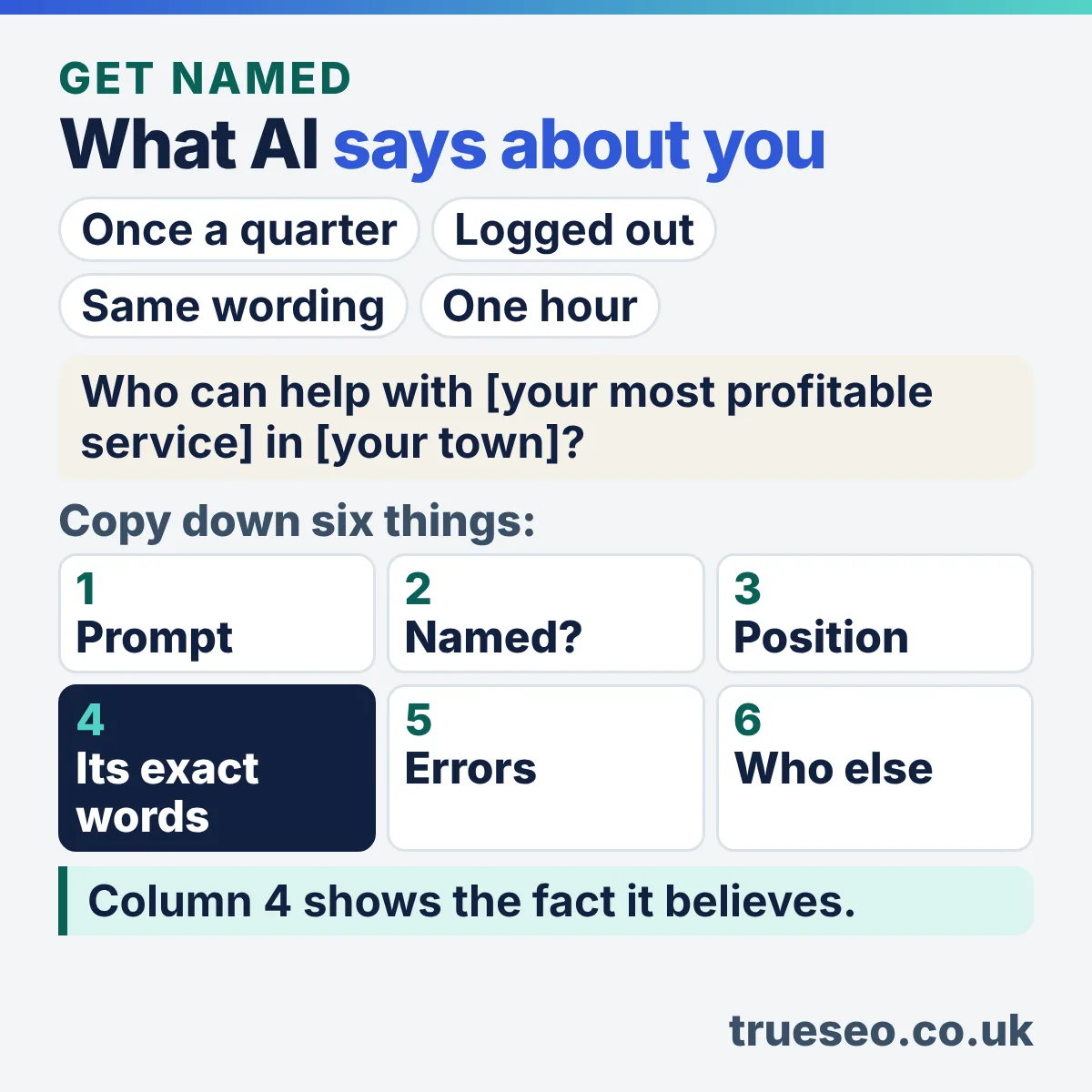
Record each answer on a six column sheet: the prompt, whether you were named, your position, the sentence the assistant actually wrote, anything wrong, and who else was named. The book’s point: the copied sentence is where the value is, because it tells you which fact the machine believes. The book allows one hour for it, once a quarter, booked in the diary.
Your checklist for getting on Google
This checklist covers the four stages in the order this guide takes them; tick each item as you finish it, and the ticks stay while this page is open.
- Listed
- Indexed
- Chosen
- Named
Becoming the default: the step after being found
Becoming the default means being the business customers are handed without a comparison, and it comes from doing the four stages above in order, then finishing one section of pages and keeping it maintained.
Become the Default describes that business as the one Google, Maps and AI hand the customer to. The book’s last practical chapter compresses everything into ten rungs, each with an honest time cost. The first four:
- One. Find out what is actually thereSearch Console, your most profitable service, what you appear forTwo hours
- Two. Make your own facts agreePush the facts sheet into every place the business appearsOne afternoon
- Three. Fix your profile and ask for reviewsThe profile fields above and the review habitThree hours, then ten minutes a week
- Four. Decide the one thingWhat kind of work you want, and what one thing you want to be known forTwo hours, and a conversation
- Rungs five to ten: the map, the page that earns, the last three inches, one finished section (two to four months of work), your own data, and maintenance dates.
“Do them in this order. The order is the advice.”
Become the Default, chapter 55
- Start at rung one, today
- Finish one section before starting another
- Do rungs one to three yourself
- Redesign the website first
- Buy a tool before you have done the job by hand twice
- Buy a quantity of anything
Nothing in the steps above needs an agency, True SEO Consultants Ltd included. The full ladder, the ninety day plan and the handbook sheets are in Become the Default, with the companion files that change kept on the book page rather than in print.
Google is a trademark of Google LLC, and this page and the book are not endorsed by or affiliated with Google in any way.
Questions owners ask about getting on Google
Is it free to put my business on Google?
Putting your business on Google is free: Google states you can add or claim your Business Profile at no charge, Search Console costs nothing to use, and there is no way to request or pay for a better local ranking. Ads are a separate, paid product.
How long does it take to appear on Google Maps?
A business appears on Google Maps once its profile is verified; Google says most verification reviews take up to five working days, edits up to three days, and rankings for new businesses up to a month to appear in search results.
Postcard codes, where that method is used, mostly arrive within 14 days. Google describes these as typical, not promised, and says some reviews take longer. Where you then appear depends on relevance, distance and prominence.
Can I get on Google Maps without a shop or office?
A business without premises customers visit can still get on Google Maps as a service area business: hide the address, list up to 20 service areas, and travel to customers. A virtual office only qualifies when it is staffed during opening hours.
Can I pay Google to rank higher on Maps?
Google states there’s no way to request or pay for a better local ranking. Paid ads can appear on Google, but they are a separate product. Ads stop the day the card stops.
Why is my business not showing on Google Maps?
A business usually fails to show on Google Maps for one of three reasons Google gives: the profile is not verified, the information is incomplete or out of date, or the profile has been suspended for breaking the guidelines. The accountancy version of this question, with the map pack causes, is covered in the guide to why an accountancy firm is not in the Google Map Pack.
- Google Business Profile Help, Add or claim your Business Profile
- Google Business Profile Help, Verify your business on Google
- Google Business Profile Help, Guidelines for representing your business on Google
- Google Business Profile Help, Manage your service areas for service-area and hybrid businesses
- Google Business Profile Help, Get started with Google Business Profile
- Google Business Profile Help, Find your business on Google
- Google Business Profile Help, Tips to improve your local ranking on Google
- Maps User Contributed Content Policy Help, Prohibited and restricted content
- Search Console Help, About Search Console
- Google Search Central, SEO Starter Guide
- Google Search Central, asking Google to revisit your URLs
- Google Search Central, AI features and your website (updated 10 December 2025)
- OpenAI, overview of OpenAI’s bots, including OAI-SearchBot
- Search Engine Journal, Bing adds GEO to official guidelines, 27 February 2026
- Google Maps Help, Ask questions in Google Maps
- Search Engine Roundtable, Google removing Q&A feature in Google Maps for AI-powered Ask button, 15 December 2025
- Gemini Apps Help, View related sources from Gemini Apps
- Competition and Markets Authority, Fake reviews (CMA208), April 2025
- Mahmud, M. A. (2026), The Accountancy Web Estate, Research Report TSC-2026-01, Zenodo